Upgrading from iPhone XR to iPhone 17 Pro Max? How to Spot a Fake Before You Pay
Upgrading from iPhone XR to iPhone 17 Pro Max? Here are the checks we'd perform before buying a used iPhone in Nigeria, including model number, Activation Lock, cameras, Face ID and replaced parts.

Moving from an iPhone XR to an iPhone 17 Pro Max is a massive upgrade. It's also exactly the kind of purchase where excitement can make you overlook warning signs.
The Nigerian used-phone market contains genuine bargains, but you'll also encounter rebuilt phones, replaced displays, carrier-locked imports, devices with used components and phones designed to resemble newer iPhones.
Some outright counterfeits can look surprisingly convincing from a distance. That's why we wouldn't authenticate an iPhone 17 Pro Max using one test. The phone has to pass several checks that agree with each other.
Here's exactly what we'd verify before paying.
1. Start With the Phone — Not the Box
A convincing box proves very little. Packaging, labels and accessories can be copied or swapped. Start with the actual device.
Go to:
Settings → General → About
Here you can see information including:
Model Name
Model Number
Serial number
IMEI
Storage capacity
Carrier Lock status
Apple confirms that tapping the part number beside Model Number reveals the hardware model number.
For the genuine iPhone 17 Pro Max, Apple currently identifies these model numbers:
A3257 — United States and Puerto Rico
A3525 — Canada, Japan, UAE and several other markets
A3527 — China mainland
A3526 — other countries and regions
Those are Apple's own identifiers, not numbers taken from marketplace listings.
If the phone reports something inconsistent, we'd stop there. But a correct-looking model number alone still isn't enough.
2. Know What a Real iPhone 17 Pro Max Looks Like
This is where knowing the genuine hardware becomes useful rather than simply repeating specifications.
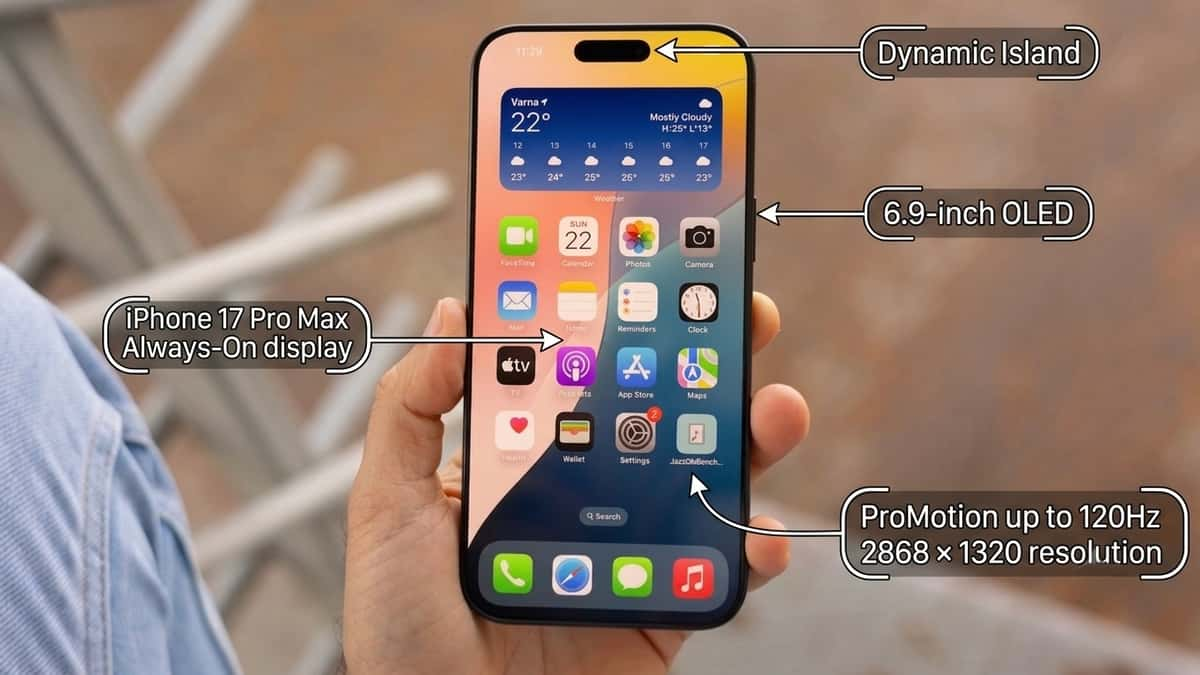
The real 17 Pro Max has a 6.9-inch Super Retina XDR OLED display, Dynamic Island, Always-On display and adaptive ProMotion up to 120Hz.
Its native resolution is 2868 × 1320. But don't stand in a shop trying to count pixels.
Instead, interact with it.
Scroll quickly through Settings or Safari
Open and close apps
Lock the phone and examine the Always-On display
Change brightness
Rotate the screen
Use Dynamic Island
A cheap counterfeit display may reveal itself through poor viewing angles, sluggish touch response, unusually large bezels, weak brightness or animations that don't behave like genuine iOS.
One clue isn't proof. Several inconsistencies together are a reason to walk away.
3. Don't Authenticate It From the About Page Alone
This is one of the most important rules in this guide.
Seeing:
iPhone 17 Pro Max
256GB
inside Settings doesn't automatically prove you're holding a genuine iPhone 17 Pro Max. A counterfeit Android device can be given an iPhone-like launcher and interface.
That's why our verification wouldn't end at Settings. We'd actually use the phone.
Open the genuine App Store.
Open Safari.
Test Face ID.
Try AirDrop if another Apple device is available.
Check Find My.
Open Apple Account settings.
Connect it to Wi-Fi.
Test Bluetooth.
Make a phone call.
Use mobile data.
Restart the device and see how it behaves from boot.
The point is to test the operating system as a functioning ecosystem, rather than trusting a screen containing the correct words.
4. Test Face ID Properly
Don't accept:
Face ID works.
Test it. Go to Face ID settings and, where appropriate on a device being prepared for sale, have the seller demonstrate that Face ID can be configured and used normally.
Lock the phone and unlock it.
A genuine iPhone 17 Pro Max uses Apple's TrueDepth system for Face ID. Face ID problems don't automatically mean the entire phone is fake.
A genuine iPhone can have damaged or replaced components.
But that's exactly why this test matters.
You're not only trying to answer: Is this an iPhone?
You're also asking: What has happened to this iPhone?
5. Test Every Rear Camera — Don't Just Count Three Circles
This is another place where appearances can mislead buyers. A genuine iPhone 17 Pro Max has three 48MP rear cameras: Main, Ultra Wide and Telephoto, alongside LiDAR and Apple's flash arrangement.
A fake manufacturer can copy three circles. That doesn't give the phone Apple's camera system
Open Camera and actually use it.
Test the different focal lengths.
Take an Ultra Wide image.
Take a normal 1× photo.
Test telephoto.
Apple's genuine camera system provides a 48MP Fusion Telephoto with 4× optical zoom and an 8× optical-quality option, while digital zoom reaches up to 40×.
Then test:
Autofocus
Portrait mode
Video
Front camera
Flash
Camera Control
Switching between cameras
Cover individual lenses carefully while switching focal lengths and observe what's happening.
If a supposed triple-camera flagship has decorative camera circles doing nothing, you've learned something very quickly.
6. Check Parts & Service History
This is one of the checks we'd consider essential on a used 17 Pro Max.
Go to:
Settings → General → About
If the iPhone has undergone relevant repairs, you may see Parts and Service History.
Apple's current system can identify the status of components including:
Battery
Display
Logic Board
Front camera
Rear cameras
Depending on what happened to the phone, Apple may label components Genuine, Used, Unknown or Unverified.
That information changes the buying conversation. A genuine phone with a replaced display isn't necessarily a bad purchase.
But you should know that before paying. Likewise, an Unknown component deserves investigation rather than being ignored because the exterior looks perfect.
This is why we'd prefer checking the actual device over listening to claims such as:
Everything original, boss.
Let the phone tell you what it can about its own repair history.
7. Check Activation Lock Before Money Changes Hands
This is even more important than spotting cosmetic imperfections.
Apple specifically advises buyers not to buy a used iPhone protected by Activation Lock.
If you see: iPhone Locked to Owner
don't pay. For a proper used-phone transaction, we'd want the seller to remove their Apple Account and erase the device.
Then begin setup. If setup asks for the previous owner's Apple Account credentials, the device is still linked to them.
Apple's guidance is straightforward: don't take ownership until the previous account has been removed.
A beautiful phone that you can't activate isn't a bargain.
8. Check Whether the Phone Is Carrier Locked
Imported iPhones create another potential problem.
Go to: Settings → General → About → Carrier Lock
For an unlocked device, Apple says you should see: No SIM restrictions.
This matters particularly when buying imported devices in Nigeria. A genuine iPhone can still be a poor purchase if it's locked to a foreign network you can't conveniently use.
And don't assume the absence of a physical SIM tray means the phone is fake. This is where knowing regional variants matters.
Apple says the iPhone 17 Pro Max models sold for the United States and several other markets are eSIM-only, while models for some other regions have a physical nano-SIM tray.
So: No SIM tray ≠ fake iPhone.
It could simply be a different regional model.
9. Check the USB-C Port and Physical Controls
The iPhone 17 Pro Max uses USB-C, not Lightning. Apple also specifies the Action button, side button and Camera Control as part of the genuine hardware layout.
Test all of them.
Connect a USB-C cable.
Make sure the phone actually charges.
Check the volume buttons.
Test the Action button.
Use Camera Control.
Inspect the port for damage or excessive movement.
Again, USB-C alone proves nothing. Plenty of Android phones have USB-C. We're looking for all the details to match simultaneously.
10. Check the Price Against Reality
This is where we'd become extremely cautious. At the time of our September 2026 check, iStore Nigeria listed the 256GB iPhone 17 Pro Max at ₦2,349,000, reduced from ₦2,499,000.
The 512GB version was listed at approximately ₦2,749,000, while 2TB was around ₦3,949,000.
A used device should obviously cost less than a new authorised-retail phone. But imagine someone offers you a supposedly clean iPhone 17 Pro Max for: ₦300,000.
That's not the moment we'd become excited. That's the moment we'd ask more questions.
Why is a phone currently selling new for well over ₦2 million being offered for a small fraction of that amount?
Possible explanations could include:
Counterfeit device
Modified older phone
Serious damage
Carrier lock
Activation Lock
Rebuilt device
Parts replacement
Fraudulent listing
There can be legitimate reasons for used-phone discounts, but the larger the difference from normal market value, the stronger the verification should become.
11. If You're Coming From an iPhone XR, Use It to Your Advantage
Someone upgrading from an XR may feel unfamiliar with newer features such as Dynamic Island, Camera Control and USB-C. But you already know how a real iPhone behaves.
Use that experience.
Open familiar apps.
Navigate Settings.
Use the App Store.
Test iMessage.
Open Safari.
Try Face ID.
Restart the phone.
Connect AirPods if available.
A fake interface may look convincing in screenshots but become much less convincing once you start moving around the operating system. The difference between an XR and 17 Pro Max should also feel substantial.
The XR uses a 6.1-inch LCD, while the genuine 17 Pro Max uses a 6.9-inch OLED with ProMotion up to 120Hz.
If the supposedly much newer flagship feels strangely cheap, slow or visually poor, investigate before paying.
Our Used iPhone 17 Pro Max Checklist
Before we'd hand over money, we'd want to verify:
Model number matches Apple's records
IMEI and serial information are present
Hardware matches the regional variant
Display behaves correctly
Dynamic Island works
Face ID works
All cameras work
Camera Control works
USB-C charges properly
Speakers and microphones work
Wi-Fi and Bluetooth work
Cellular service works
Carrier Lock says No SIM restrictions if sold as unlocked
Parts & Service History has been checked
Battery condition has been checked
Activation Lock has been removed
Seller allows the device to be erased and activated
Price makes sense for the condition
One successful check should never override five failed ones.
Frequently Asked Questions
Can a fake iPhone have a valid-looking serial number?
Don't use a serial number as your only authenticity test. The safer approach is to compare identifiers with the actual hardware and then test the device's Apple functionality, cameras, Face ID, activation status and repair history.
Does the iPhone 17 Pro Max have a SIM card slot?
It depends on the region. Apple says several regional versions are eSIM-only, including the US model, while models for other countries and regions can include a physical nano-SIM tray.
How can I check whether an iPhone has replaced parts?
Go to: Settings → General → About
If applicable, look for Parts and Service History.
Apple can provide information about the battery, display, logic board and cameras on supported models.
Should I buy an iPhone that says Unknown Part?
We wouldn't automatically call the entire phone fake. Apple says an Unknown status can appear when a part is non-genuine, isn't functioning as expected, has an incomplete installation or under certain other replacement circumstances. It should, however, affect how you evaluate the device and its price.
Is a ₦300,000 iPhone 17 Pro Max likely to be genuine?
Price alone can't authenticate a phone. But considering that an authorised Nigerian retailer currently lists a new 256GB iPhone 17 Pro Max at approximately ₦2.349 million, we'd treat a supposed clean unit offered for ₦300,000 with extreme caution and verify everything before considering payment.
Final Thoughts
If you're upgrading from an iPhone XR to an iPhone 17 Pro Max, don't authenticate your next phone by looking at the camera bump. And don't authenticate it because Settings says: iPhone 17 Pro Max.
We wouldn't even rely on a model number alone. A safer used-iPhone purchase is built from several checks that all tell the same story.
Verify the model and identifiers.
Test Face ID.
Use every camera.
Inspect Parts & Service History.
Check Carrier Lock.
Test cellular service.
Confirm the regional hardware makes sense.
Make sure Activation Lock is completely removed.
And finally, compare the asking price with what genuine devices are actually selling for.
Apple itself advises used-iPhone buyers to inspect physical condition, battery health and Parts & Service History and not to buy a device protected by Activation Lock.
That's the approach we'd follow too. The most dangerous used iPhone isn't necessarily the obvious fake with a terrible screen.
It's the phone that looks genuine enough to make you stop checking. So if a seller starts rushing you, refuses to let you test the device, won't erase it in front of you or tells you not to worry about something you want to verify, we'd rather miss the supposed bargain.
There will always be another iPhone. Your money is harder to replace.

Author
Dolapo AnifowosheTech enthusiast and technical data scientist who loves to play with numbers. Explore author & articles