





Dell XPS 13 vs MacBook Air M5: Which Is Better in Nigeria?
Meta Description: Dell XPS 13 vs MacBook Air M5 comparison for Nigerian buyers. Compare price, performance, display, battery, AI, portability and value.

If you're spending around ₦2 million or more on an ultraportable laptop in Nigeria, the Dell XPS 13 and Apple's 13-inch MacBook Air M5 deserve to be compared for more than their processors.
Both are premium aluminium laptops designed for people who value portability, but they approach that goal differently.
Dell's latest XPS 13 can be configured with Intel's eight-core Core Ultra 7 355, up to 32GB LPDDR5X memory and a 13.4-inch 2.5K touchscreen running at up to 120Hz. Apple combines its 10-core M5 CPU with up to a 10-core GPU, 16GB–32GB unified memory and as much as 4TB storage.
The Dell is lighter and gives you Windows, touch input and 120Hz. The MacBook Air gives you a fanless design, MagSafe, substantially more maximum storage and Apple's tightly integrated hardware/software ecosystem.
For Nigerian buyers, there's another important difference: the MacBook Air M5 already has established local pricing, while the exact Core Ultra 7 355 XPS remains much harder to find.
Dell XPS 13 vs MacBook Air M5 Specifications
Feature | Dell XPS 13 | MacBook Air M5 13-inch |
|---|---|---|
Processor | Intel Core Ultra 7 355 | Apple M5 |
CPU | 8 cores, up to 4.7GHz | 10 cores |
Graphics | Integrated Intel Graphics | Up to 10-core GPU |
AI hardware | Dedicated NPU | 16-core Neural Engine + GPU Neural Accelerators |
Memory | 16GB / 32GB LPDDR5X | 16GB / 24GB / 32GB unified |
Storage | Up to 1TB SSD | 512GB–4TB SSD |
Display | 13.4-inch touchscreen | 13.6-inch Liquid Retina |
Resolution | 2560 × 1600 | 2560 × 1664 |
Refresh rate | 30–120Hz | 60Hz |
Touchscreen | Yes | No |
Brightness | 500 nits | 500 nits |
Battery | 52Wh | 53.8Wh |
Apple-rated battery | — | Up to 18 hours video |
Weight | From 1kg | About 1.24kg |
Charging | 65W USB-C | MagSafe 3 / USB-C |
Ports | 2 × Thunderbolt 4 | MagSafe + 2 × Thunderbolt 4 + headphone jack |
Wireless | Wi-Fi 7 / Bluetooth 6.0 | Wi-Fi 7 / Bluetooth 6 |
OS | Windows 11 | macOS |
Biometrics | Windows Hello | Touch ID |
Dell confirms the 1kg starting weight, 52Wh battery, Wi-Fi 7, Bluetooth 6.0 and two Thunderbolt 4 ports on Core Ultra configurations. Apple confirms the M5 Air's 13.6-inch 500-nit display, 53.8Wh battery, MagSafe and two Thunderbolt 4 connections.
How Much Are They in Nigeria?
This is where our comparison became more interesting. The MacBook Air M5 is already officially available through iStore Nigeria, and current pricing is lower than some early import estimates.
At the time of our check:
Configuration | Current Nigeria Price |
|---|---|
MacBook Air M5 16GB/512GB | ₦1,999,000 |
MacBook Air M5 16GB/1TB | ₦2,699,000 |
MacBook Air M5 24GB/1TB | ₦2,969,000 |
XPS 13 Ultra 7 355 | No dependable local price found |
XPS 13 Ultra 7 258V 16GB/512GB* | ₦2.55m–₦3.05m |
XPS 13 Ultra 7 258V 32GB/1TB* | ₦2.95m–₦3.25m |
Older XPS generation shown only as a Nigerian market reference, not as the price of the Core Ultra 7 355 model.
iStore Nigeria currently lists the M5 16GB/512GB at ₦1,999,000, while Jumia listings we found were higher at roughly ₦2.4m–₦2.6m for similar 16GB/512GB configurations. That demonstrates why we'd check authorised and marketplace sellers before buying.
The Dell is more difficult. We found older XPS 13 9350 Core Ultra 7 258V configurations between approximately ₦2.55 million and ₦3.25 million on Jumia Nigeria, but we couldn't verify dependable Nigerian retail stock of the exact Core Ultra 7 355 DX13260 configuration.
We'd therefore avoid inventing a precise Nigerian price for it.
Display: Dell Gives You More Interaction
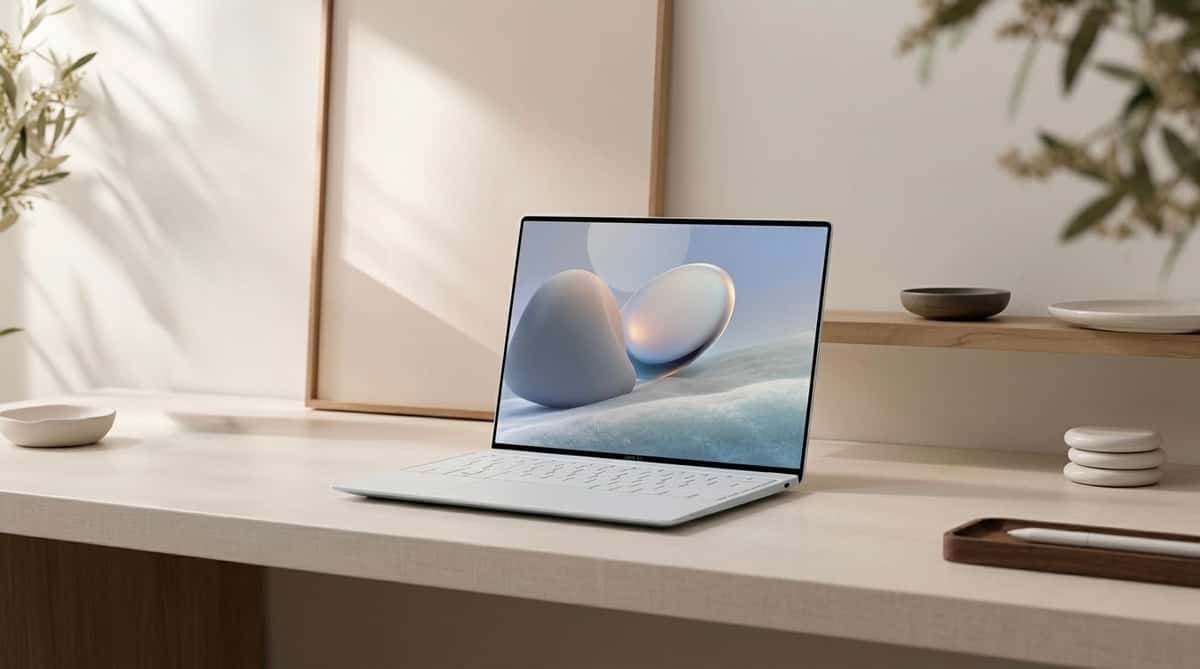
This is one of the clearest hardware differences. The XPS 13's 13.4-inch 2560 × 1600 touchscreen dynamically operates between 30Hz and 120Hz, reaching 500 nits.
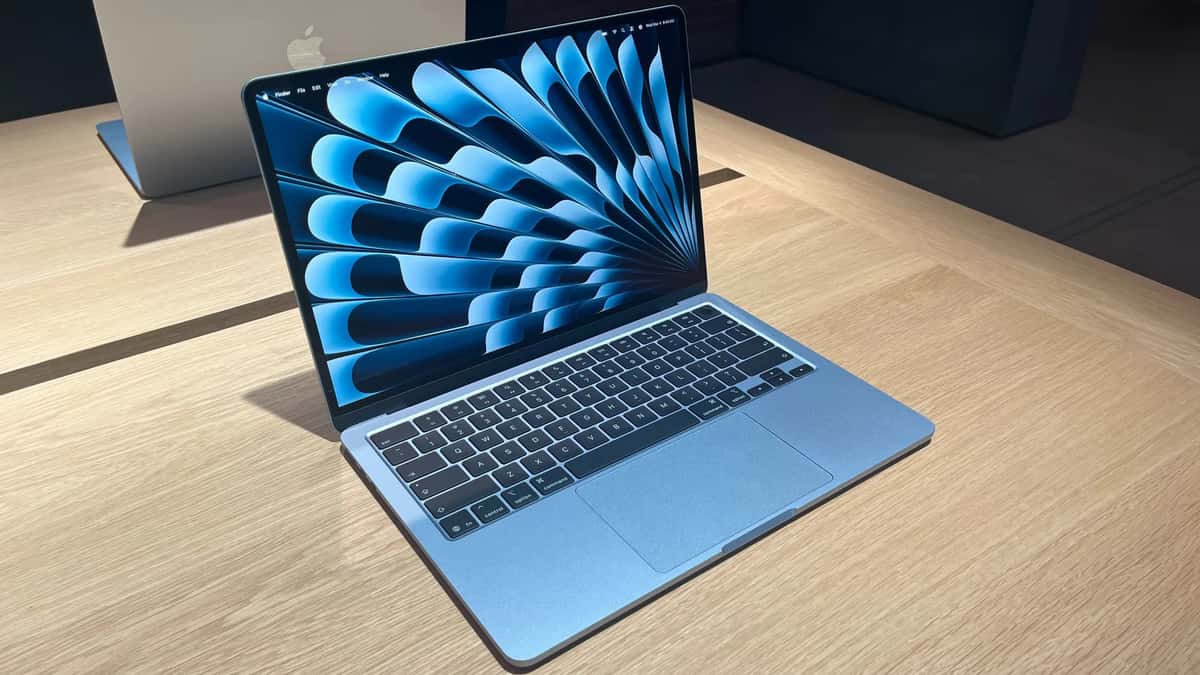
The MacBook Air has a slightly larger 13.6-inch 2560 × 1664 Liquid Retina IPS display, also reaching 500 nits, with Wide P3 colour and True Tone.
But Apple's screen remains 60Hz and doesn't support touch. If you're accustomed to a 120Hz smartphone, Dell's smoother scrolling is noticeable. Touch is also useful for navigating certain Windows interfaces and applications.
Apple counters with excellent colour reproduction and its well-established Retina display quality. Our research therefore doesn't support simply calling one screen universally superior.
Choose Dell for: 120Hz and touchscreen interaction.
Choose MacBook Air for: a strong colour-focused conventional laptop display where touch isn't important.
Performance: Architecture Matters More Than Core Counts
Comparing eight Intel cores with ten Apple cores doesn't tell you which laptop will be faster in your applications.
They're fundamentally different platforms. Dell's Core Ultra 7 355 has eight CPU cores and reaches up to 4.7GHz. It is paired with integrated Intel graphics and dedicated AI hardware.
Apple's M5 has a 10-core CPU, up to a 10-core GPU, 16-core Neural Engine and a Neural Accelerator built into each GPU core. Apple also specifies 153GB/s unified-memory bandwidth.
Apple claims the M5 Air can deliver up to 1.9× the AI video-enhancement performance of the M4 Air in Topaz Video, up to 1.5× its Blender rendering performance and up to 1.5× its Affinity image-processing performance. Those are Apple's controlled comparisons rather than Afritech Connect benchmark results, so we'd treat them accordingly.
The more interesting difference is sustained workload behaviour. The MacBook Air is completely fanless, which makes it silent but means sustained heavy workloads eventually have to be managed passively.
The XPS 13 uses a conventional active cooling approach. For short productivity workloads, everyday development and normal creative work, both have plenty of performance.
For lengthy rendering, model training or GPU-intensive professional work, we'd question whether either ultraportable is the right category of laptop.
AI: Don't Buy Either Laptop Just for the AI Label
Both manufacturers are pushing AI heavily. The XPS 13 is a Copilot+ PC, meaning its Intel platform includes dedicated NPU hardware for supported Windows AI workloads.
Apple uses its Neural Engine and GPU Neural Accelerators for Apple Intelligence and on-device machine-learning workloads. Apple specifically positions M5 around faster local AI processing, including running large language models locally.
But we'd put this into practical context. If you're using Claude Code, Codex, GitHub Copilot or another primarily cloud-based coding agent, the laptop's NPU isn't necessarily the deciding factor because much of the heavy model computation happens remotely.
Where hardware matters more is local AI. Windows Copilot+ functionality naturally favours the Dell, while developers working with Apple's MLX ecosystem or Apple Intelligence may prefer the Mac.
For serious CUDA-dependent machine learning, however, we'd choose neither. An NVIDIA-equipped workstation or gaming laptop makes considerably more sense.
Battery: The MacBook Air Has a Stronger Paper Case
Apple specifies a 53.8Wh battery and rates the 13-inch M5 Air for up to 18 hours of video streaming or 15 hours of wireless web browsing.
Dell gives the XPS 13 a slightly smaller 52Wh battery. Manufacturer battery figures aren't directly comparable because test conditions differ, so we wouldn't claim that an 18-hour Apple figure automatically beats a Dell figure measured under another methodology.
Still, Apple's fanless architecture and long history of strong Apple-silicon efficiency make battery endurance one of the MacBook Air's major attractions.
For Nigerian users, that isn't a minor feature. If you're working through an outage, travelling between meetings or spending a day somewhere without convenient charging, an extra few hours away from the wall can matter more than benchmark performance.
Portability: The 1kg Dell Is Remarkably Light
The XPS 13 starts at just 1kg and measures 12.7mm thick The 13-inch MacBook Air is roughly 1.24kg.
A difference of around 240g doesn't sound dramatic until you carry a laptop, charger, phone, power bank and other equipment every day.
This is one area where Dell's engineering deserves attention. You're getting a 13.4-inch touchscreen, 52Wh battery, aluminium chassis and Core Ultra processor at approximately the weight of some much smaller machines.
If your laptop spends most of its life on a desk, this matters little. If you move around Lagos with it every day, it matters considerably more.
Ports: Apple Has a Practical Advantage
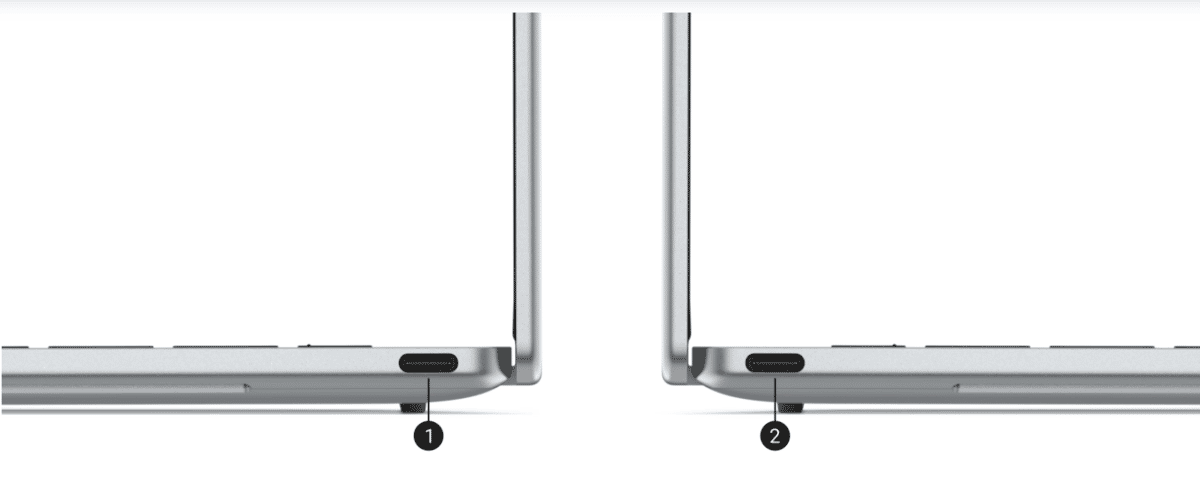
Both machines provide two Thunderbolt 4 ports. But their charging arrangements are different. Dell's two Thunderbolt 4 connections also handle USB-C power, meaning plugging in the charger can leave you with one free port. There's also no card reader. Apple gives you two Thunderbolt 4 ports plus MagSafe 3 and a 3.5mm headphone jack.
So charging doesn't have to occupy one of your Thunderbolt connections.
For photographers, developers and office users with lots of peripherals, neither laptop is generous.
You'll probably want a USB-C/Thunderbolt hub. But Apple's separate charging connection makes its minimal port selection slightly less restrictive.
MacBook Air Has Another Advantage: 4TB Storage
One difference we wouldn't overlook is maximum storage. Dell currently offers the XPS 13 DX13260 with SSD configurations reaching 1TB.
The M5 MacBook Air starts at 512GB and can be configured with up to 4TB for the first time. Apple also says the new SSD delivers twice the read/write performance of the previous generation under its testing.
Most buyers don't need 4TB. But video editors, photographers and developers working with large local datasets may appreciate having the option. The downside is obvious: Apple's storage upgrades can become extremely expensive.
Windows vs macOS May Decide This Comparison
We wouldn't switch operating systems just because one laptop wins more specification categories. The XPS 13 makes more sense when your workflow depends on Windows. That can include .NET development, Windows-only business software, particular engineering applications, corporate management tools and the broader Windows gaming ecosystem.
The MacBook Air makes more sense if you already rely heavily on Apple's ecosystem.
An iPhone, AirPods and other Apple devices integrate tightly with macOS through features such as Continuity and iPhone Mirroring. Apple also gives developers a Unix-based environment that remains popular for web and software development.
Software compatibility should therefore come before benchmark arguments.
Developers: Think About What You're Actually Building
For web development, backend engineering, Python, cloud infrastructure and AI-assisted programming, either laptop can work extremely well. MacBook Air becomes particularly attractive if you work heavily with Unix tooling, iOS development or Apple's development ecosystem.
XPS becomes the natural choice for Windows-specific development.
Memory is another consideration. Both can reach 32GB, which is what we'd target if you're regularly running Docker containers, databases, large IDE sessions and multiple browser windows simultaneously. Neither should be confused with a mobile GPU workstation.
Gaming: Windows Has More Games, but Neither Is a Gaming Laptop
This category needs nuance. The M5 includes an up-to-10-core GPU, enhanced shader cores and third-generation hardware ray tracing. Apple specifically highlights improved gaming and 3D rendering capability.
The XPS 13 uses integrated Intel graphics. However, Windows still provides access to a much broader PC game catalogue.
That doesn't automatically make the Dell the better gaming machine—the specific game's compatibility and GPU requirements matter. If gaming is a serious purchasing priority, we'd skip both ultraportables and buy a machine with a dedicated GPU.
Cameras: Apple Has the More Ambitious Webcam
Video calls matter more than they did a few years ago. Dell equips the XPS 13 with a 2MP 1080p camera plus IR hardware for Windows Hello.
Apple uses a 12MP Center Stage camera supporting Desk View.
For someone constantly on Zoom, Teams or FaceTime, that's worth considering.
Dell's IR hardware has its own convenience advantage because Windows Hello can authenticate you by face, whereas the MacBook Air uses Touch ID.
Which Makes More Sense for Nigerian Buyers?
Our market research changes this comparison significantly. The MacBook Air M5 16GB/512GB currently costs ₦1,999,000 through iStore Nigeria.
Meanwhile, older XPS 13 Core Ultra 7 configurations are already around ₦2.55m–₦3.25m on Jumia, and we haven't yet found dependable Nigerian retail pricing for the newer Ultra 7 355 configuration.
That means we'd compare actual quotations rather than assuming Dell will be cheaper because it's a Windows laptop.
For students and ordinary professionals, the 16GB/512GB M5 Air is currently positioned more aggressively than we expected.
For Windows professionals, that doesn't make the Mac automatically preferable. If your work requires Windows, paying for the correct platform is more important than saving money on incompatible hardware.
Frequently Asked Questions
Is the Dell XPS 13 better than the MacBook Air M5?
Neither is universally better. Dell gives you a lighter 1kg chassis, 120Hz touchscreen and Windows. Apple offers a fanless M5 platform, MagSafe, longer maximum storage, strong battery claims and deep Apple ecosystem integration.
Which has the better display?
The XPS offers the more flexible hardware: 120Hz plus touch. The MacBook Air offers Wide P3 colour and Apple's 13.6-inch Liquid Retina panel but remains 60Hz and non-touch.
Which is cheaper in Nigeria?
Of the configurations we could actually verify locally, the MacBook Air M5 currently starts lower. iStore lists 16GB/512GB at ₦1,999,000, while Nigerian listings for the previous-generation XPS 13 Ultra 7 258V are around ₦2.55 million and above.
Which is better for programming?
It depends on your toolchain. macOS is excellent for Unix-oriented development and required for native Apple-platform development. Windows is preferable when your work requires Windows-specific software, while WSL also gives Windows developers access to a Linux environment.
Is the MacBook Air M5 worth its Nigerian price?
At ₦1,999,000 for the current 16GB/512GB iStore configuration, you're paying for M5 performance, a premium aluminium chassis, long battery endurance, a high-quality display and Apple's ecosystem. Whether that's good value depends on whether those advantages fit your workflow.
Final Verdict
After researching both machines, we wouldn't reduce this comparison to “Mac is faster” or “Dell has the better screen.”
Their strengths are more specific. The Dell XPS 13 gives you something genuinely unusual: a 1kg Windows Copilot+ PC with an eight-core Core Ultra 7 355, up to 32GB RAM and a 13.4-inch 120Hz touchscreen.
That's a compelling package for Windows developers, consultants, business travellers and anyone who values touch interaction and minimum carrying weight.
The MacBook Air M5 takes another approach. You get Apple's 10-core M5 CPU, up to a 10-core GPU, 16GB–32GB unified memory, 512GB–4TB storage, a fanless chassis, MagSafe charging, 12MP Center Stage camera and up to 18 hours of Apple-rated battery life.
But the Nigerian price comparison is what surprised us. At the time of our research, iStore Nigeria lists the M5 16GB/512GB at ₦1,999,000, while older Core Ultra 7 XPS 13 configurations are already selling for substantially more through some Nigerian retailers. That makes the base M5 Air particularly interesting for someone who is comfortable with macOS.
But we wouldn't recommend changing operating systems simply to save money.
If your applications, corporate environment or development workflow require Windows, the XPS 13's 120Hz touchscreen, 1kg weight and Core Ultra platform provide a combination the MacBook Air doesn't replicate.
If your software works equally well on both platforms, compare the exact RAM and storage configurations at the price you're actually being quoted in Nigeria. That's more useful than comparing their starting prices in different countries.
For someone already using an iPhone and comfortable with macOS, the M5 Air's current Nigerian pricing makes a strong case.
For someone who needs Windows or genuinely values a 120Hz touchscreen and the lightest possible chassis—the XPS 13 remains the more relevant machine.
The deciding question isn't which laptop has the longer specification sheet. It's which operating system and hardware advantages you'll actually use every day.
Read more: Dell XPS 13 Review: Core Ultra 7 Power in a Tiny Laptop for Africa

Author
Dolapo AnifowosheTech enthusiast and technical data scientist who loves to play with numbers. Explore author & articles
Related Articles

Best Gaming Laptop 2026: Gigabyte A16 vs HP Omen Max 16 — Which One Should Nigerians Buy?
Gigabyte A16 vs HP Omen Max 16: compare RTX 5070 performance, processor, display, RAM, storage, cooling, price and value for Nigerian gamers.

iPhone 17 Pro Max vs Xiaomi 17 Pro Max: Which Is Better?
iPhone 17 Pro Max vs Xiaomi 17 Pro Max comparison covering cameras, performance, displays, battery, software, international price and Nigeria price.

Apple Watch Series 12 vs Series 11: Is the Upgrade Worth It?
Apple Watch Series 12 vs Series 11 comparison covering health tracking, performance, battery, design and Nigerian prices to see whether the upgrade is noticeable.

Apple Watch Series 12 vs Ultra 4: Which Should You Buy?
Apple Watch Series 12 vs Ultra 4 comparison covering battery life, health tracking, fitness, durability, price and which Apple Watch suits you.

iPhone 18 Pro Max vs Samsung Galaxy S26 Ultra: Which Flagship Should You Buy?
iPhone 18 Pro Max vs Samsung Galaxy S26 Ultra comparison covering performance, cameras, battery, displays, gaming, AI, Nigerian prices and value.

MacBook Screen Goes Black When You Open It Wide? It Might Not Be the Motherboard (Flexgate Explained)
Does your MacBook screen work at one angle but turn black when opened wider? The problem could be a display flex cable rather than the motherboard. Here's what to check before paying for repairs.
OPPO Reno16 vs OPPO Find X10: The Price Gap Is Big, but So Is the Hardware Difference
OPPO Reno16 vs Find X10 comparison covering cameras, performance, battery, display and prices to see which phone offers better value.
Comments (0)
Leave a comment
Comments cannot be edited or deleted after posting. Please review your comment before submitting.
No comments yet. Be the first to share your thoughts using the form above.