Dell XPS 13 Review: Core Ultra 7 Power in a Tiny Laptop for Africa
Dell's new XPS 13 packs Intel Core Ultra 7 355, up to 32GB RAM, 1TB SSD and a 120Hz touchscreen. See specs, features and expected Nigeria price.

Dell has refreshed the XPS 13 for 2026 with an Intel Core Ultra 7 355 option, giving its smallest premium Windows laptop substantially more processing capability without turning it into a bulky workstation.
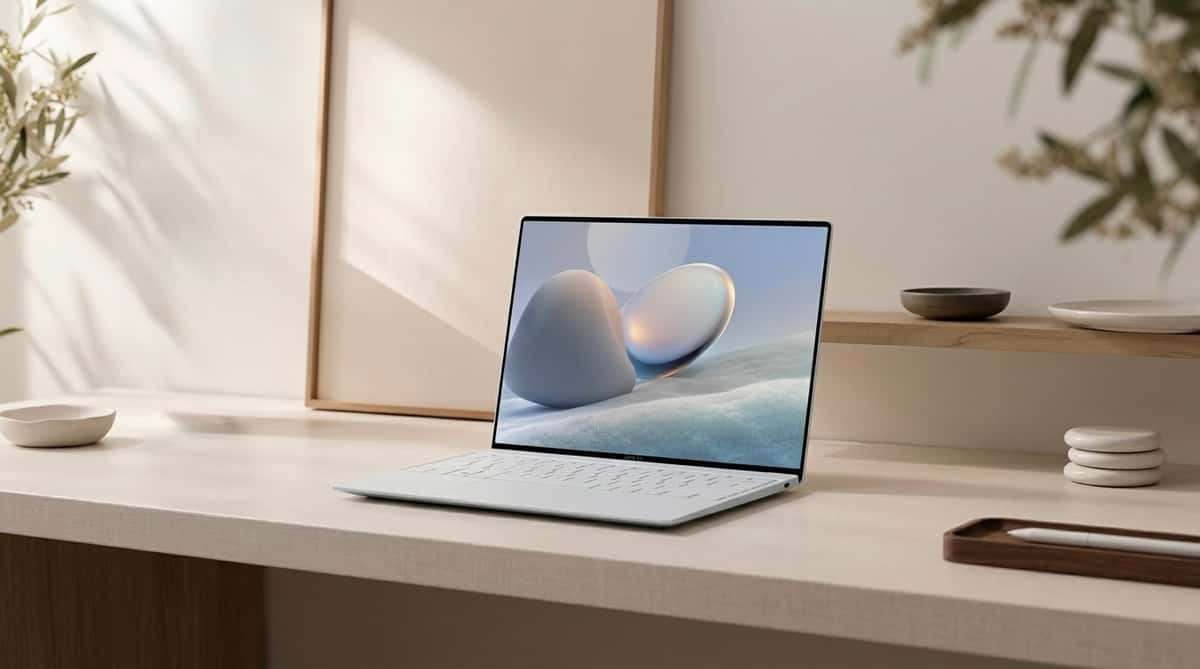
After examining Dell's current configurations, the interesting part isn't simply the processor. The XPS 13 can combine the eight-core Core Ultra 7 355 with up to 32GB LPDDR5X memory, a 1TB PCIe SSD and a 13.4-inch 2.5K touchscreen running at up to 120Hz, all inside a CNC-aluminium machine starting at just 1kg.
That combination makes it particularly relevant to developers, business travellers, students and remote professionals who want serious Windows capability without carrying a 14- or 16-inch laptop.
For Nigerian buyers, though, we'd look beyond the specifications. The real question is whether the portability advantage justifies what could become a ₦3 million-class purchase once the higher-end Core Ultra 7 configuration reaches local sellers.
Dell XPS 13 2026 Specifications
Feature | Dell XPS 13 Core Ultra 7 355 |
|---|---|
Processor | Intel Core Ultra 7 355, 8 cores, up to 4.7GHz |
RAM | Up to 32GB LPDDR5X |
Storage | Up to 1TB PCIe NVMe SSD |
Display | 13.4-inch 2.5K touchscreen |
Resolution | 2,560 × 1,600 |
Refresh rate | 30–120Hz |
Brightness | 500 nits |
Graphics | Integrated Intel Graphics |
Battery | 52Wh |
Charging | 65W USB-C GaN adapter |
Webcam | 2MP FHD + IR |
Speakers | Quad speakers, 8W total |
Wireless | Wi-Fi 7, Bluetooth 6.0 |
Ports | 2 × Thunderbolt 4 USB-C |
Dimensions | 296.9 × 200.66 × 12.7mm |
Weight | From 1kg |
Operating system | Windows 11 |
Nigeria price | ₦3m–₦4m+ expected for higher configurations |
Dell's current configurator confirms the Core Ultra 7 355 as an eight-core processor reaching 4.7GHz, alongside the 52Wh battery, 65W GaN adapter and 2.5K variable-refresh touchscreen.
The 13.4-Inch 120Hz Screen Is a Major Selling Point
One feature we think deserves more attention than the processor is the display. The XPS 13 uses a 13.4-inch, 2,560 × 1,600 touchscreen with a variable refresh rate between 30Hz and 120Hz and brightness reaching 500 nits.
That variable refresh rate makes sense on a laptop this small. When you're scrolling through webpages, navigating Windows or working in applications where fluid movement matters, the panel can reach 120Hz. When that extra refresh rate isn't necessary, dropping lower can reduce unnecessary display power consumption.
It's also a useful distinction against many thin productivity laptops that still use conventional 60Hz screens.
For developers, writers and office users, the extra resolution means sharper text. Designers and photographers should appreciate the higher-quality panel, although anyone doing colour-critical professional work should still calibrate the specific unit rather than relying entirely on advertised display capabilities.
Core Ultra 7 355: Plenty of CPU Power in a 1kg Laptop
The biggest hardware upgrade is Intel's Core Ultra 7 355. Dell specifies eight CPU cores, 12MB cache and clock speeds reaching 4.7GHz. The Core Ultra configuration also qualifies as a Copilot+ PC and uses integrated Intel graphics rather than a discrete NVIDIA or AMD GPU.
The important part for us is what that hardware means in normal work. A 32GB configuration gives considerably more breathing room for workloads involving:
VS Code
Large browser sessions
Docker containers
Local databases
Python development
Data analysis
Microsoft Office
AI coding assistants
Multiple external applications
That's the type of workload where we'd consider paying for 32GB. For normal browsing, documents, streaming and university assignments, however, buying the most expensive configuration would be difficult to justify. A 16GB configuration should be enough for many users.
RAM and Storage: Choose Carefully
Dell currently offers memory configurations reaching 32GB LPDDR5X, while SSD capacity extends to 1TB.
For a machine this expensive, we'd target at least 16GB RAM. The 32GB/1TB configuration makes more sense for developers and professionals planning to keep the machine for several years, particularly because the memory is integrated rather than something we'd buy expecting to upgrade casually later.
Storage requirements are more personal. 512GB should be adequate if most of your documents live in OneDrive, Google Drive, GitHub or another cloud service. Developers working with large projects, virtual environments, datasets and local media may find 1TB considerably more comfortable.
Dell XPS 13 Price in Nigeria
This is where the buying decision becomes complicated. When the Core Ultra 7 355 XPS 13 initially appeared in China, reported pricing started at ¥14,464 for 16GB/512GB, increasing to ¥20,011 for the 32GB/1TB configuration.
Availability has since expanded. Dell's U.S. configurator now offers the Core Ultra 7 355 as a $500 processor upgrade over the base Core 5 320 configuration, with additional charges for higher RAM and storage.
Nigeria is more difficult because local XPS pricing depends heavily on importer, generation, warranty and exact specification. During our current Nigerian market check, we found an XPS 13 with Core Ultra 7 258V, 32GB RAM and 1TB SSD listed at ₦2.95 million. That's not the new 355 model, but it provides a useful indication of what premium XPS hardware already costs locally.
Another local listing for a Core Ultra 7 XPS 13 was around ₦2.599 million, again using an older 256V-series processor. Based on those prices and the international positioning of the new configuration, we'd budget approximately: Dell XPS 13 Core Ultra 7 355: ₦3 million–₦4 million+
That's our market estimate, not an official Dell Nigeria price. A 16GB/512GB import could land lower, while 32GB/1TB stock with a substantial retailer margin could move beyond that range.
1kg Changes How You Use a Laptop
Raw processing performance isn't actually what makes this XPS unusual.
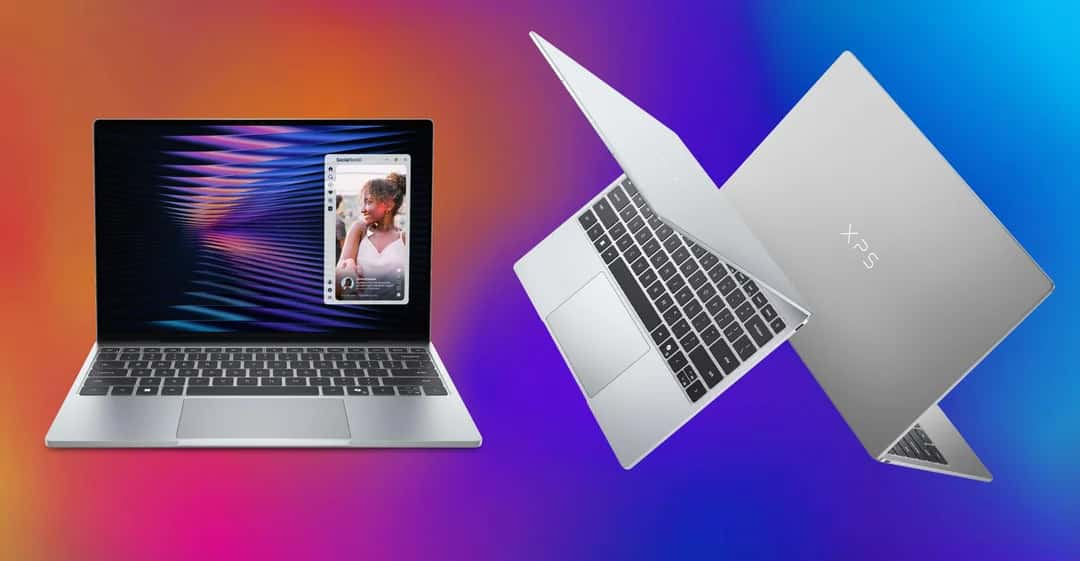
It's the weight. Dell lists the new XPS 13 at 1kg, with a thickness of just 12.7mm. The chassis is CNC aluminium.
For someone carrying a laptop around Lagos every day, that matters. Think about moving between an office, university, client meeting, co-working space and home while also carrying a charger, power bank and other equipment. Saving several hundred grams becomes noticeable.
But Two USB-C Ports Is a Real Compromise
The minimal design has a cost. The Core Ultra version gives you two Thunderbolt 4 USB-C ports with DisplayPort 2.1 and Power Delivery, but there's no built-in SD card reader.
For a laptop aimed at professionals, that's restrictive. Connect power to one port and you effectively have one remaining port unless you're using a dock.
Photographers, developers with multiple peripherals and business users connecting HDMI displays, USB drives or Ethernet will probably need a USB-C hub.
At this price, we'd factor the cost of a good Thunderbolt/USB-C dock into the purchase.
Battery and Charging
The XPS 13 contains a 52Wh three-cell battery and Dell supplies a compact 65W USB-C GaN charger with the current U.S. Core Ultra configuration.
We wouldn't predict real battery life from capacity alone. A 52Wh battery powering a 2.5K 120Hz touchscreen can behave very differently depending on brightness, refresh rate, workload, video calls and background applications.
The advantage is USB-C charging. If you already travel with a capable USB-C PD charger for other devices, you may be able to simplify the number of chargers in your bag.
Is the XPS 13 Good for Developers?
This is one of the use cases where the laptop makes the most sense. A developer can realistically carry a 1kg Windows machine with 32GB RAM and 1TB storage while still having enough memory for an IDE, browser, database and several development tools running together.
But we'd separate software development from GPU-heavy AI development. For web development, Python, data analysis, backend work, coding agents and cloud-based AI workflows, the XPS 13 is compelling.
For training substantial machine-learning models locally, CUDA development, 3D rendering or other GPU-intensive work, it isn't the machine we'd choose.
The integrated Intel graphics are the limiting factor.
What About Gaming?
We wouldn't buy the XPS 13 as a gaming laptop. The 120Hz screen may look like a gaming specification, but refresh rate and gaming capability aren't the same thing.
Without a dedicated GPU, modern demanding titles will require compromises in resolution and graphics settings, and the extremely thin chassis isn't designed like a large gaming laptop built around sustained GPU cooling.
Light games should be fine. If Call of Duty, Cyberpunk, GTA or other graphically demanding titles are the priority, we'd put the money toward a laptop with dedicated NVIDIA graphics instead.
Who Should Buy the Dell XPS 13?
The strongest case isn't simply “someone who wants a powerful laptop.” It's someone who specifically values performance per kilogram.
A developer carrying a machine to work every day, a consultant constantly travelling between clients, an executive who wants Windows in the smallest premium package, or a student with the budget for a long-term premium laptop can all make good use of it.
Content creators should be more selective. The high-resolution touchscreen is attractive, but serious video editing and 3D workloads may justify sacrificing portability for a larger laptop with dedicated graphics.
Final Verdict: You're Paying for Performance per Kilogram
The 2026 Dell XPS 13 makes more sense once you stop judging it like a conventional performance laptop.
Its attraction is fitting an eight-core Core Ultra 7 355, up to 32GB RAM, 1TB storage and a 2.5K 120Hz touchscreen into a CNC-aluminium machine starting at only 1kg and 12.7mm thick. That's a compelling combination for developers, professionals and frequent travellers who genuinely carry their computer every day.
Our research also found some compromises we'd consider before paying the premium. Integrated graphics limit serious gaming and GPU-heavy AI workloads. Two USB-C ports mean many professionals will need a hub. And 32GB RAM and 1TB storage can push the price considerably higher.
Nigeria makes the value equation even tougher. Existing high-end XPS 13 configurations already approach ₦3 million locally, while the Core Ultra 7 355 model occupies an even newer part of Dell's lineup.
So we wouldn't buy this simply because it's a powerful laptop. We'd buy it if we specifically needed a powerful Windows laptop that almost disappears inside a bag.
For someone working primarily at a desk, ₦3 million–₦4 million can buy larger machines with better cooling, more ports and dedicated graphics. But for a Nigerian developer, executive or remote professional who values mobility as much as processing power, the XPS 13's combination of 1kg weight, 32GB memory ceiling and 120Hz touchscreen is what makes it stand out.
Our take: The XPS 13 is an impressive ultra-portable, but the 32GB configuration is the one we'd target for serious professional work. Just don't pay workstation money expecting workstation-class GPU performance.
Read more: HP ZBook Fury G1i 16 Review: 192GB RAM and Pro Graphics
Read more: Dell XPS 13 vs MacBook Air M5: Which Is Better in Nigeria?
Read more: Best Portable Power Banks for Laptop Charging in Nigeria (2026 Buyer's Guide)

Author
Adebayo JohnsonSenior tech editor with over 4 years of experience covering mobile and gadget technology. Explore author & articles