Gigabyte P34 at ₦680,000: Used-Market Gaming Laptop Review
Is a fairly used UK-sourced Gigabyte P34 gaming laptop with Core i7, 32GB RAM, 2TB SSD and GTX 1050 worth ₦680,000? We compare its performance, gaming ability and alternatives in Nigeria.

Should You Buy the Gigabyte P34 for ₦680,000?
Finding a good gaming laptop in Nigeria for under ₦700,000 can be difficult, particularly if you want something with plenty of RAM and storage. That is why a fairly used UK-sourced Gigabyte P34 with an Intel Core i7 processor, 32GB RAM, 2TB M.2 SSD and NVIDIA GTX 1050 may look attractive at ₦680,000.
On paper, the specification sounds impressive. But there is an important catch: the Gigabyte P34 is an old gaming laptop. The P34G v7 was built around a 7th-generation Intel Core i7-7700HQ and NVIDIA GeForce GTX 1050 with 2GB GDDR5, hardware that dates back several years. Gigabyte confirms that the laptop supports up to 32GB DDR4 memory and dual storage. So the real question isn't whether the laptop has 32GB RAM or 2TB storage.
It is:
Is ₦680,000 a good price for the performance you're actually getting?
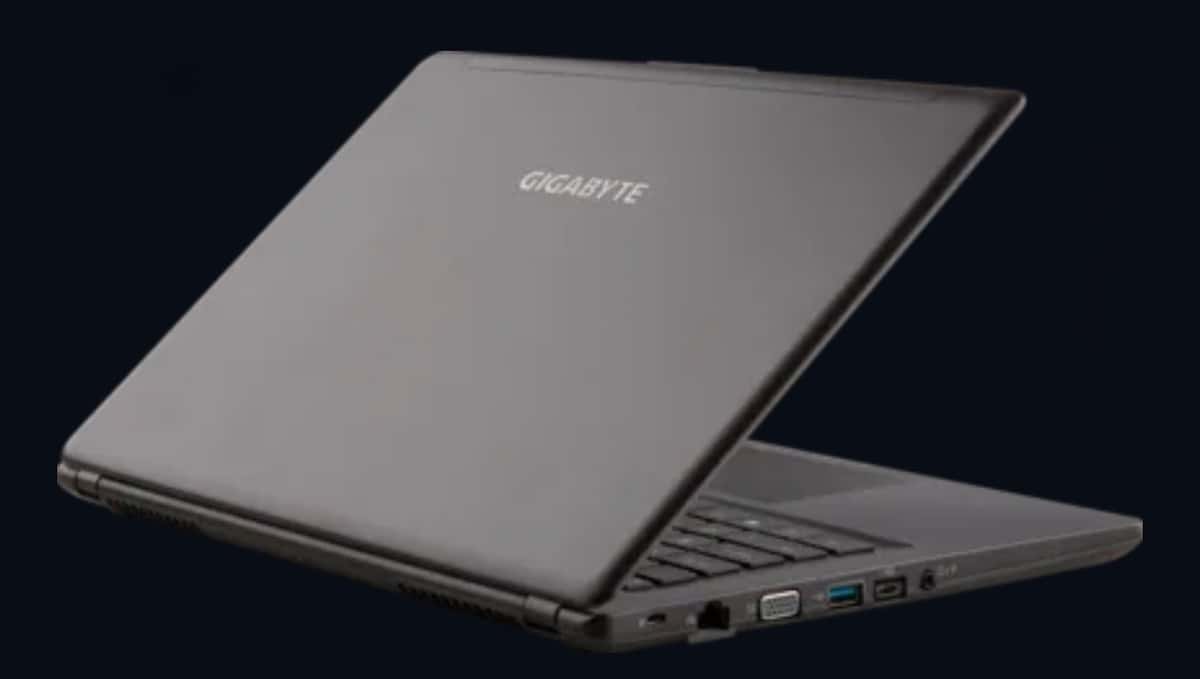
Gigabyte P34 Specifications
Specification | Gigabyte P34 |
|---|---|
Processor | Intel Core i7-7700HQ |
Generation | 7th Gen |
GPU | NVIDIA GeForce GTX 1050 |
GPU Memory | 2GB GDDR5 |
RAM | 32GB DDR4 |
Storage | 2TB M.2 SSD* |
Display | 14-inch Full HD IPS |
Resolution | 1920 × 1080 |
Keyboard | Full-size backlit |
Battery | 61.25Wh |
Weight | Approximately 1.69kg |
Ports | USB 3.0, USB-C, HDMI, Ethernet, SD card |
Price discussed | ₦680,000 |
Condition | Fairly used / UK sourced |
The original P34 platform supported an M.2 SSD plus a separate 2.5-inch storage drive, so buyers should verify exactly how the 2TB configuration is installed.
The Biggest Problem: The GTX 1050
The GTX 1050 is the component that should receive the most attention before buying this laptop. The P34G v7 officially uses the 2GB version of the GTX 1050. This was a reasonable entry-level gaming GPU when the laptop launched, but today's games are considerably more demanding. That means the laptop shouldn't be marketed as a modern high-performance gaming machine simply because it has an Intel Core i7 and 32GB RAM. For older games and esports titles, however, the GTX 1050 can still be useful.
Games such as older versions of GTA V, FIFA/EA Sports FC, CS2, Valorant, Fortnite and similar titles can be playable with appropriate graphics settings, although performance will depend heavily on the game, resolution and thermal condition of the particular used machine.
For newer AAA games, expectations should be much lower. The 2GB VRAM is particularly limiting.
Don't Be Fooled by the 32GB RAM
One of the biggest selling points of this particular unit is its 32GB RAM. That is excellent for multitasking. You could comfortably run a browser with many tabs, Microsoft Office, programming environments, Photoshop and other applications simultaneously. But RAM doesn't magically turn the GTX 1050 into a modern gaming GPU. For gaming, the GPU remains the major limitation. In other words:
32GB RAM = excellent
2TB SSD = excellent
Core i7 = still useful
GTX 1050 2GB = the weak point
This is an important distinction when evaluating used gaming laptops.
Performance for Students and Professionals
Interestingly, the Gigabyte P34 may make more sense as a general-purpose performance laptop than as a gaming machine. The combination of 32GB RAM and a large SSD gives you plenty of room for:
Programming
Web development
Office applications
Photo editing
Light video editing
Data analysis
Virtual machines
General multitasking
The Core i7-7700HQ is a four-core/eight-thread mobile processor, running from 2.8GHz up to 3.8GHz according to Gigabyte's specifications. For everyday computing, it remains usable. However, buyers should remember that this is 7th-generation Intel hardware, not a modern Core i7 or Core Ultra processor.
The Surprisingly Good Part: Portability
Gaming laptops are often large and heavy. The P34 is different. Gigabyte designed the P34G v7 to weigh approximately 1.69kg, which is relatively light for a laptop carrying a dedicated NVIDIA GPU.
It also has a 14-inch Full HD IPS display. That makes the laptop interesting for Nigerian students and professionals who need to move between home, school, work and other locations. You get dedicated graphics performance without carrying a huge 15.6-inch gaming machine.
What About the Display?
The P34 has a 14-inch 1920 × 1080 IPS display. For productivity, Full HD remains perfectly usable at this size. It should be comfortable for browsing, programming, documents and watching videos. But don't expect the features found on many newer gaming laptops. There is no modern high-refresh-rate gaming panel in the original specification. If you're buying this specifically for competitive gaming, a newer laptop with a 120Hz or 144Hz display and a stronger GPU would be considerably more attractive.
Storage Is a Major Advantage
The advertised 2TB SSD is arguably one of the most useful upgrades on this particular used machine. Gigabyte's P34 platform was designed around a dual-storage configuration, supporting an M.2 PCIe SSD alongside a 2.5-inch drive. The company lists support for up to a 1TB M.2 PCIe SSD and up to a 2TB HDD in its original specifications. Because the machine you're considering reportedly has 2TB of M.2 storage, verify the exact SSD configuration before paying.
A seller saying "2TB storage" isn't enough.
Ask:
Is it actually a 2TB NVMe SSD?
Then check it yourself using Windows Disk Management or a drive-health utility.
Is ₦680,000 a Good Price?
This is where the purchase becomes difficult to recommend. At around ₦680,000, you're entering a part of the Nigerian used-laptop market where newer GTX 1650 machines can appear. For example, a current Jiji listing shows a used laptop with a Core i7, 16GB RAM, 512GB SSD and GTX 1650 4GB for ₦680,000. Another Lagos listing currently shows a Dell G5 with a Core i5-9300H, 16GB RAM, GTX 1650 4GB, 128GB SSD + 1TB HDD for ₦650,000.
These listings don't mean every GTX 1650 laptop is automatically a better deal—the condition, model and seller matter but they demonstrate why ₦680,000 for a GTX 1050 2GB deserves careful consideration.
Gigabyte P34 vs Newer GTX 1650 Laptops
Feature | Gigabyte P34 | Typical GTX 1650 Used Laptop |
|---|---|---|
CPU generation | Older | Generally newer |
GPU | GTX 1050 2GB | GTX 1650 4GB |
RAM | 32GB | Usually 16GB |
Storage | 2TB | 512GB–1TB |
Gaming potential | Basic/older games | Better |
VRAM | 2GB | 4GB |
Portability | Excellent | Varies |
Upgrade potential | Good | Varies |
Price examples | ₦680,000 | ₦650k–₦750k |
The biggest advantage of the GTX 1650 isn't just raw GPU performance. Its 4GB VRAM gives it considerably more breathing room than the P34's 2GB GTX 1050.
Who Should Buy the Gigabyte P34?
The P34 makes sense for a specific type of buyer. I'd consider it if you want a relatively lightweight laptop with plenty of RAM and storage for programming, school, office work and occasional gaming. It's also attractive if you specifically value its 14-inch size and approximately 1.69kg weight. But I'd be much less enthusiastic if your primary objective is playing modern games.
Who Should Stay Away?
Avoid it if you're looking for:
Modern AAA gaming performance.
High-refresh-rate competitive gaming.
A laptop that will remain gaming-capable for many years.
Strong GPU performance for demanding 3D applications.
The GTX 1050 2GB is simply too old to make this a compelling long-term gaming investment at ₦680,000.
What to Check Before Paying ₦680,000
If you decide to inspect the machine, don't hand over the money before checking the following.
1. Check the GPU: Open Windows Device Manager or NVIDIA software and confirm that it actually contains the GTX 1050 2GB.
2. Check the CPU: Verify that the processor is actually the Core i7-7700HQ or whatever exact CPU the seller advertised.
3. Check the SSD: Confirm that the advertised 2TB is actually installed and check its health.
4. Test temperatures: Run a demanding game or benchmark for at least 15–20 minutes and watch CPU/GPU temperatures.
5. Test the battery: A fairly used machine can have substantially reduced battery capacity.
6. Test the display: Look for dead pixels, brightness problems and screen flickering.
7. Test every port: Check USB, USB-C, HDMI, Ethernet, headphone jack and SD-card functionality.
8. Check the keyboard and charger: Replacement chargers and damaged keyboards can add unexpected costs.
Our Verdict: Is the Gigabyte P34 Worth ₦680,000?
Not as a pure gaming laptop. The Gigabyte P34 remains an interesting machine because of its lightweight 1.69kg body, 14-inch Full HD IPS display, 32GB maximum memory support and dual-storage design.
But the GTX 1050 2GB is now the limiting factor. At ₦680,000, I'd strongly recommend checking the market for a fairly used GTX 1650 4GB laptop first. Current Nigerian listings show GTX 1650 machines appearing around the same price range, including a Core i7 model at ₦680,000 and a Dell G5 at ₦650,000.
Verdict: Only buy if the condition is excellent and you specifically value the 32GB RAM, 2TB storage and lightweight design. Otherwise, spend your ₦680,000 on a newer GTX 1650 machine if gaming is the priority.
The key lesson for Nigerian laptop buyers is simple: don't let "Core i7 + 32GB RAM + 2TB SSD" distract you from the graphics card. For a gaming laptop, the GPU can matter far more than having an enormous amount of RAM or storage.
Frequently Asked Questions
Is the Gigabyte P34 still good for gaming?
It can handle older and less demanding games, but its GTX 1050 2GB limits its ability to run newer games comfortably.
Is 32GB RAM enough for gaming?
Yes. In this laptop, 32GB is more than enough for most gaming workloads. The bigger limitation is the GTX 1050's 2GB VRAM.
Is ₦680,000 expensive for a used Gigabyte P34?
It is relatively expensive when you consider the age of the GTX 1050. Current Nigerian listings show some GTX 1650 laptops around ₦650,000–₦680,000, making comparison shopping important.
Should I buy the P34 for programming?
It can still be a capable programming machine, particularly with 32GB RAM and a large SSD. Its lightweight design is also useful for students and developers who move around frequently.
What is the biggest weakness of the Gigabyte P34?
The GTX 1050 2GB is the biggest weakness if gaming is your priority. The processor and RAM can still be useful, but the GPU is considerably older than what you can find in newer used gaming laptops.
Read more: Best Gaming Laptop 2026: Gigabyte A16 vs HP Omen Max 16 — Which One Should Nigerians Buy?
Read more: Lenovo ThinkPad X13 Gen 7: Ultra-Light Laptop With 30-Hour Battery

Author
Nkechi OkaforMobile device specialist focused on smartphones, tablets, and wearables for the African market. Explore author & articles