


Lenovo ThinkPad X13 Gen 7: Ultra-Light Laptop With 30-Hour Battery
Lenovo ThinkPad X13 Gen 7 brings Intel Panther Lake, up to 32GB RAM, 5G and over 30 hours of battery life in a lightweight business laptop.
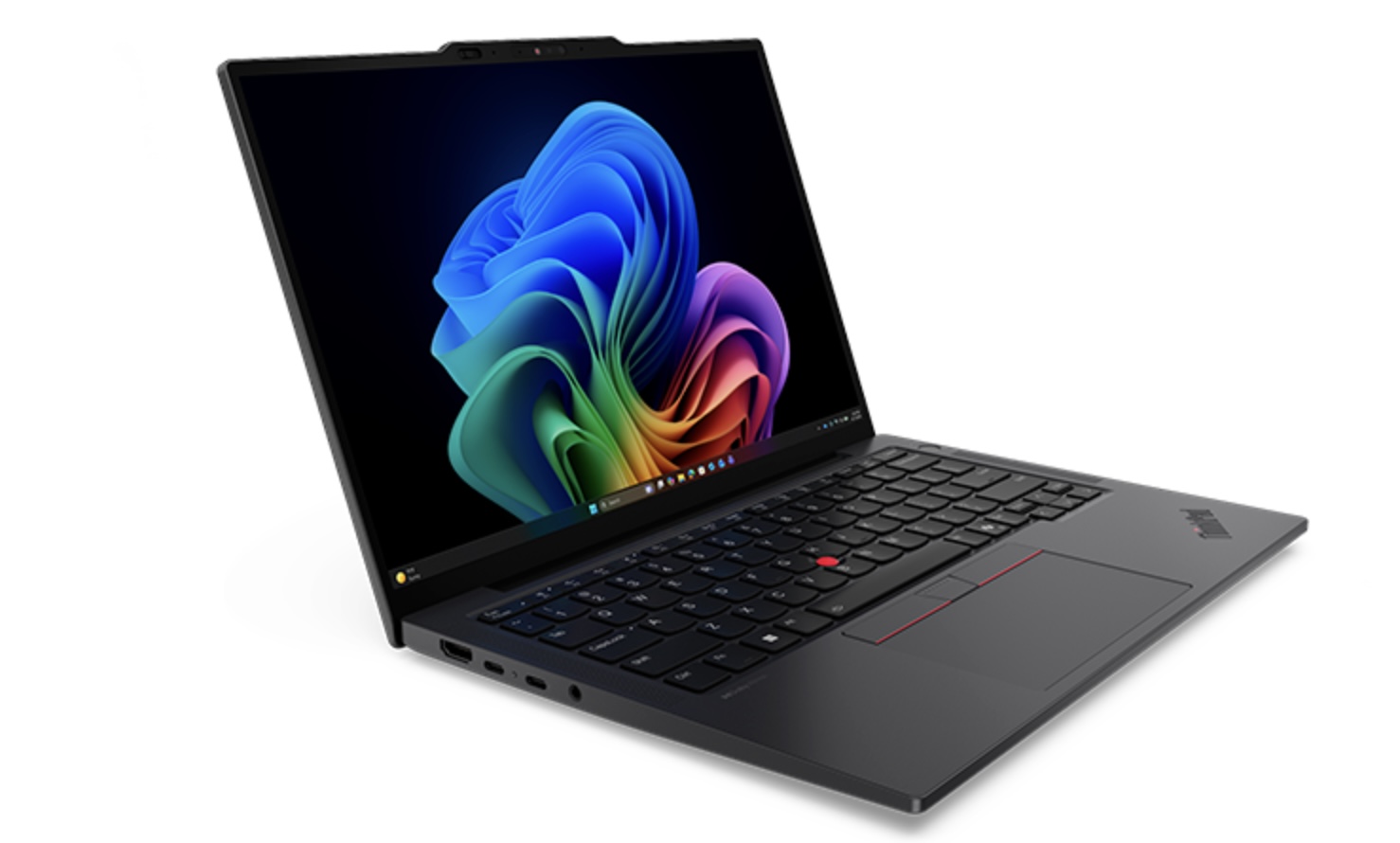
Lenovo's New ThinkPad X13 Gen 7 Is Built for Professionals on the Move
Lenovo is expanding the international availability of its latest ThinkPad X13 Gen 7, giving more users access to an ultra-light business laptop powered by Intel's latest Core Ultra Series 3 processors. The new 13-inch ThinkPad combines a compact design with up to 32GB of RAM, 1TB SSD storage, optional 5G connectivity and a large 54.7Wh battery.
For African professionals, developers, consultants, students and remote workers who regularly move between offices, homes and coworking spaces, the biggest attraction may be its weight and battery life. Lenovo says the laptop can weigh as little as 930g, while its larger battery configuration is rated for up to 30.1 hours of local video playback under specific testing conditions.
What Makes the ThinkPad X13 Gen 7 Different?
The ThinkPad X13 Gen 7 is designed primarily as a mobile business laptop, rather than a gaming or entertainment machine.
Its combination of:
Lightweight construction
Intel Core Ultra processors
Up to 32GB RAM
PCIe SSD storage
Optional 5G
Wi-Fi 7
Long battery life
ThinkPad keyboard and TrackPoint
makes it particularly interesting for people who need a professional computer that can travel easily. Lenovo positions the X13 Gen 7 as an ultra-mobile AI PC for modern workers, with support for Windows 11 and Copilot+ PC experiences on compatible configurations.
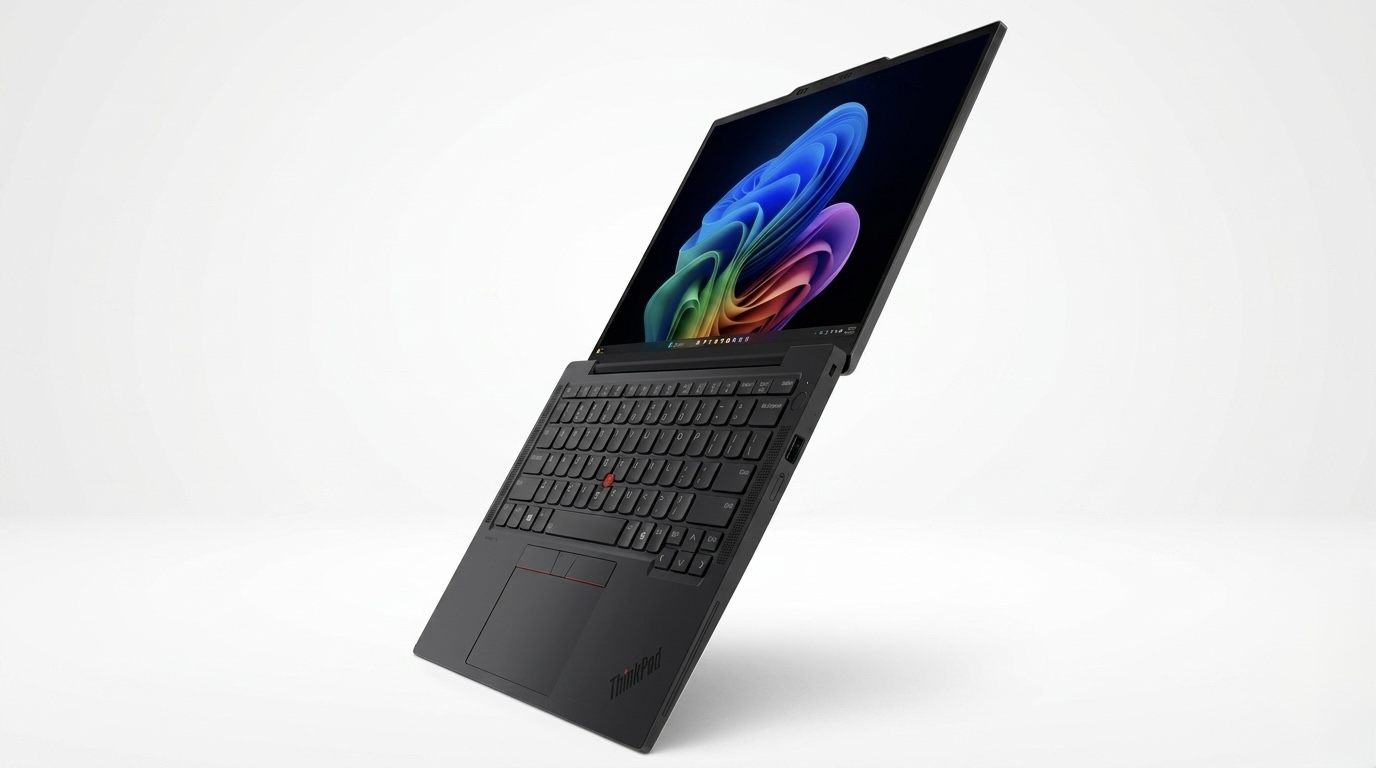
Intel Panther Lake Comes to the ThinkPad X13
One of the biggest upgrades is Lenovo's use of Intel Core Ultra Series 3 processors. Depending on the market and configuration, buyers can find processors including:
Intel Core Ultra 5 325
Intel Core Ultra 5 332
Intel Core Ultra 5 335
Intel Core Ultra 5 336H
Intel Core Ultra 7 355
Intel Core Ultra 7 356H
Intel Core Ultra 7 365
The higher-end Core Ultra 7 356H, for example, features 16 cores and integrated Intel graphics, while the Core Ultra 7 355 provides 8 cores and up to 4.7GHz P-core frequency. This makes the X13 Gen 7 considerably more interesting for developers and professionals running AI-assisted productivity tools than an ordinary entry-level business laptop.
Up to 32GB RAM and 1TB SSD
Lenovo offers the ThinkPad X13 Gen 7 with up to 32GB of soldered LPDDR5X memory. Storage can reach 1TB, with the laptop using an M.2 2280 SSD slot. Some configurations support PCIe 5.0 x4 storage.
However, there's an important consideration for buyers. The RAM is soldered, meaning you cannot simply replace or upgrade it later. If you expect to use the laptop for programming, data analysis, virtual machines or demanding professional applications, buying the 32GB configuration from the beginning may be the smarter decision.
13.3-Inch Display
The ThinkPad X13 Gen 7 uses a 13.3-inch WUXGA IPS display with a resolution of 1,920 × 1,200. The display offers:
400-nit brightness
100% sRGB coverage
16:10 aspect ratio
Anti-glare surface
60Hz refresh rate
Touch or non-touch configurations
The 16:10 aspect ratio is particularly useful for productivity because it provides more vertical workspace than traditional 16:9 laptop displays.
For coding, spreadsheets, documents and web applications, the screen should be more practical than the specifications might initially suggest. However, people looking for a high-refresh-rate display for gaming may want to look elsewhere.
The Biggest Attraction: Battery Life
Battery life could be the X13 Gen 7's strongest feature. Lenovo offers either a 41Wh or 54.7Wh battery. The larger 54.7Wh configuration is rated for up to:
29.7 hours in Lenovo's JEITA-BAT 3.0 video/idle testing and up to 30.1 hours of local video playback under specified test conditions. Of course, you should not expect to browse Chrome, compile software, run AI models and attend video calls for 30 hours on a single charge. Real-world battery life will depend heavily on:
Screen brightness
Wi-Fi/5G usage
Applications
Processor configuration
Background processes
Power mode
Still, the battery capacity combined with Intel's efficiency improvements makes this a particularly interesting machine for people who spend long periods away from a power outlet.
5G Connectivity Is Available
Another useful feature is optional cellular connectivity. Lenovo offers configurations with:
4G LTE
5G
That means users can potentially connect directly to a mobile network without relying on their phone's hotspot. For professionals working from locations where Wi-Fi isn't reliable, this can be extremely useful. However, availability of specific 4G/5G configurations will depend on the market.
Connectivity and Ports
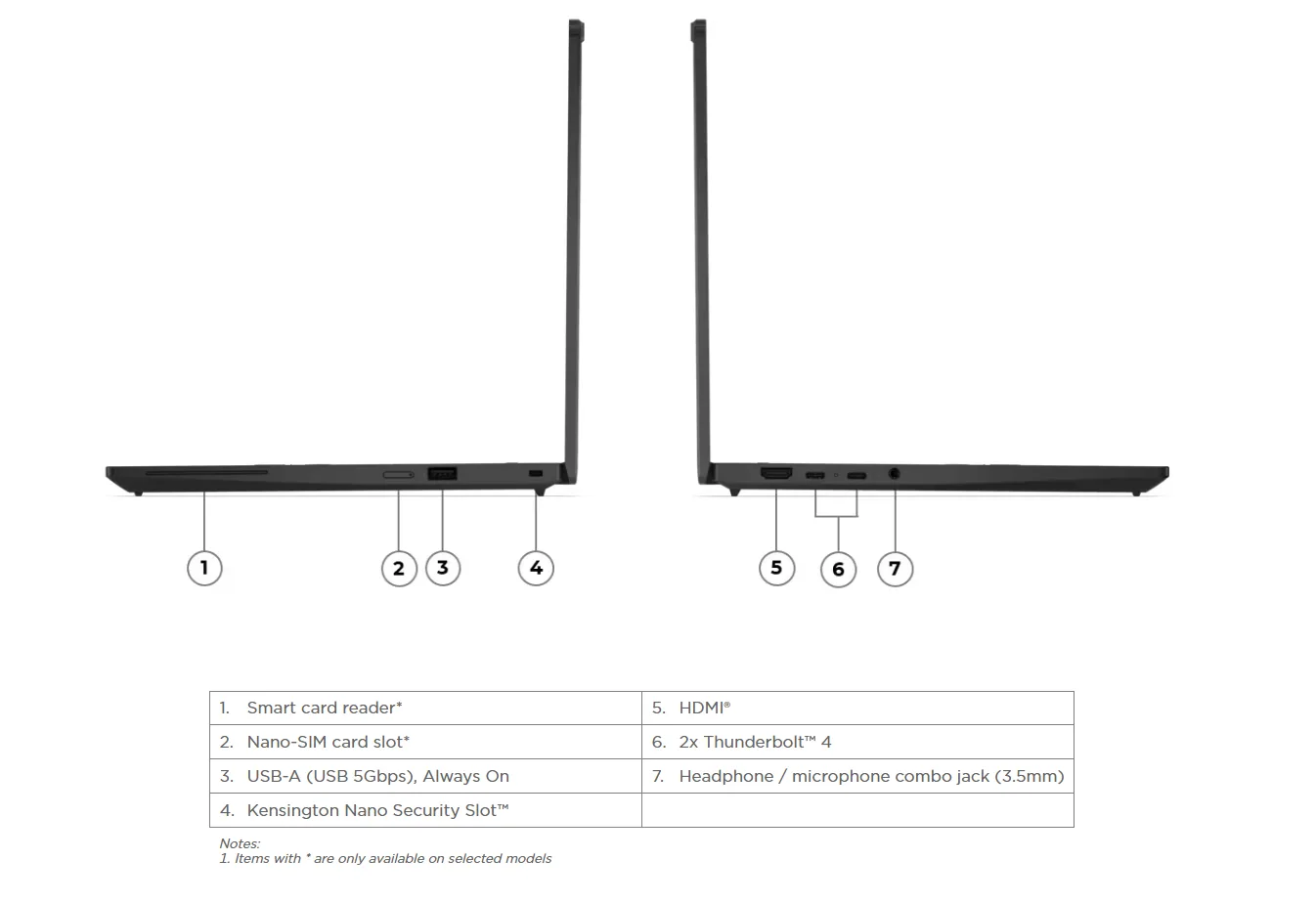
Despite its small size, Lenovo has retained a useful selection of ports. The X13 Gen 7 includes:
2 × Thunderbolt 4
1 × USB-A
HDMI
3.5mm headphone/microphone jack
Optional Nano-SIM slot
Wi-Fi 7
Bluetooth 5.4
The combination is useful for connecting external monitors, storage drives, accessories and other workplace equipment without immediately needing a USB hub.
How Much Could the ThinkPad X13 Gen 7 Cost in Nigeria?
Lenovo's pricing varies significantly depending on the country and configuration. The laptop has been listed internationally at prices equivalent to roughly ₦3.3 million and above, although Nigerian retail pricing can be considerably different once shipping, taxes, distributor margins and configuration are taken into account.
For Nigerian buyers, the exact price will therefore depend heavily on the seller and whether the machine is officially imported or brought in through independent distributors.
Our advice: don't judge the X13 Gen 7 purely by its price. This is a premium business laptop aimed at buyers who value portability, battery life, security, connectivity and reliability rather than maximum gaming performance.
Frequently Asked Questions
How much does the Lenovo ThinkPad X13 Gen 7 cost in Nigeria?
Expect premium pricing, with international configurations translating to roughly ₦3.3 million or more before Nigerian-specific taxes, shipping and retailer margins. Actual Nigerian pricing will vary by configuration and seller.
Does the ThinkPad X13 Gen 7 support 5G?
Yes. Lenovo offers configurations with optional 4G and 5G cellular connectivity.
How much RAM does it have?
The X13 Gen 7 can be configured with up to 32GB LPDDR5X RAM in many markets. The memory is soldered and isn't designed for user upgrades.
Can it last 30 hours?
Lenovo's testing indicates up to approximately 30.1 hours of local video playback with a particular 54.7Wh configuration. Real-world usage will generally be lower.
Is the ThinkPad X13 Gen 7 good for programming?
Yes. Configurations with Core Ultra processors and 32GB RAM should be well suited to software development, particularly web development, cloud development and AI-assisted coding workflows.
Is it good for gaming?
It's not designed as a gaming laptop. Its integrated graphics are better suited to productivity, media and lighter workloads.
Final Verdict
The Lenovo ThinkPad X13 Gen 7 is an interesting example of where premium Windows laptops are heading. Instead of simply increasing processor performance, Lenovo has focused on something many professionals actually need: mobility without sacrificing productivity. You get modern Intel Core Ultra processors, up to 32GB RAM, 1TB storage, optional 5G, Wi-Fi 7, Thunderbolt 4 and a battery that Lenovo rates for more than 30 hours of local video playback in a specific configuration.
For Nigerian and African professionals who travel frequently, work remotely or move between multiple locations, the sub-1kg design and optional cellular connectivity could be more valuable than raw benchmark numbers. The main drawback is likely to be price. This isn't positioned as an affordable laptop, and the soldered RAM also means buyers need to choose their memory configuration carefully.
Our pick: Excellent for professionals, developers and frequent travelers who prioritize portability and battery life.
If you want a lightweight Windows laptop that you can carry around Africa all day without feeling like you're carrying a brick, the ThinkPad X13 Gen 7 deserves serious consideration.
Related Articles
Dell XPS 13 Review: Core Ultra 7 Power in a Tiny Laptop for Africa
Dell's new XPS 13 packs Intel Core Ultra 7 355, up to 32GB RAM, 1TB SSD and a 120Hz display. See specs, features and Nigeria price.
MacBook Screen Goes Black When You Open It Wide? It Might Not Be the Motherboard (Flexgate Explained)
If your MacBook screen works only at certain angles or goes black when you open the lid fully, you may be dealing with the Flexgate display issue—not a motherboard fault. Here's what you need to know before paying for repairs.
Samsung Galaxy Z Fold 8 Ultra Review: Price in Nigeria & Africa
Samsung Galaxy Z Fold 8 Ultra review covering its 8-inch display, 200MP camera, battery, AI features and estimated Nigeria price.
Tecno POVA 8 Pro 5G Tonino Lamborghini Review: A Luxury Gaming Phone for Africa
Tecno POVA 8 Pro 5G Tonino Lamborghini brings premium Italian-inspired design, 144Hz AMOLED display, 6500mAh battery and powerful gaming features.
RedMagic Astra 2 Review: Specs, Gaming Performance & Price
RedMagic Astra 2 review covering its 9.06-inch OLED display, Snapdragon 8 Elite Gen 5, battery, cooling, gaming performance and Nigeria price.
Tecno Pova 8 Pro 5G Review: Price, Specs and What Nigerians Should Know
Tecno Pova 8 Pro 5G review, specs, features and expected Nigeria price. See its 144Hz AMOLED display, Dimensity 7400, 6500mAh battery and camera.

Google Pixel 11 Review: Gemini Intelligence, Camera Upgrades and Nigeria Price
Google Pixel 11 brings Gemini Intelligence, new camera tools, Tensor G6 and smarter AI features. See Pixel 11 prices, features and Nigeria availability.
Comments (0)
Leave a comment
Comments cannot be edited or deleted after posting. Please review your comment before submitting.
No comments yet. Be the first to share your thoughts!