How to Buy a Budget Laptop for Data Analysis and Web Development in Africa 2026 Guide
Looking for a cheap laptop to learn data analysis or web development in Africa? Here is exactly what to look for, recommended specs, Nigerian prices, used vs new advice and mistakes to avoid.

You don't need a ₦1 million laptop to start learning Python, data analysis or web development. But in 2026, we'd also be careful about buying the cheapest laptop you can find.
After checking current Nigerian prices, there's a particularly interesting part of the market around ₦350,000–₦600,000, where used and refurbished business laptops can offer substantially better specifications than some cheap new machines.
A ThinkPad, Latitude or EliteBook with 16GB RAM and an SSD may be a much better development machine than a shiny new laptop with 4GB RAM and slow storage.
The important thing is knowing which specifications actually matter.
First: What Are You Planning to Learn?
Don't buy a laptop before understanding your workload. For data analysis, you're likely to use tools such as:
Microsoft Excel
Power BI
SQL
Python
pandas
Jupyter Notebook
Tableau
Google Colab
Web browsers
For web development, your setup could include:
VS Code
HTML/CSS
JavaScript
TypeScript
React/Next.js
Node.js
Git/GitHub
Local databases
Docker eventually
Chrome with many tabs
None of those basic learning workloads requires an RTX gaming GPU.
That's good news. For a beginner, we'd put the money into RAM, CPU, SSD, battery and display quality before worrying about dedicated graphics.
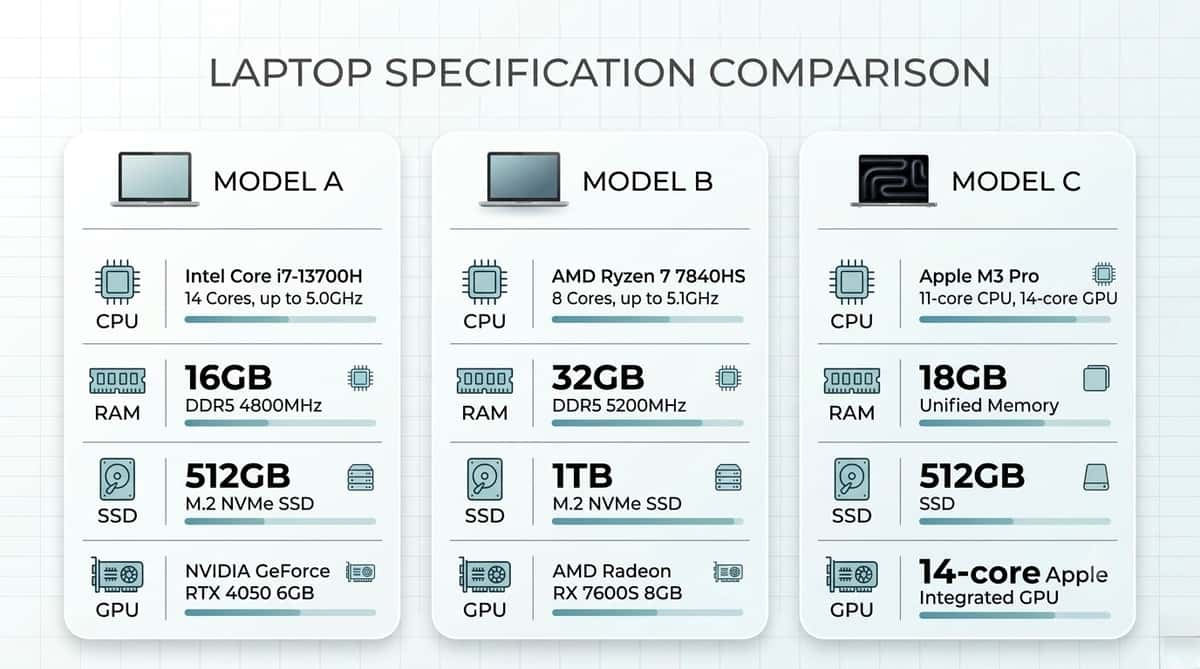
Our Minimum Laptop Specification in 2026
For someone learning data analysis or modern web development, this is the baseline we'd target:
Component | Minimum We'd Buy | Better Target |
|---|---|---|
RAM | 8GB | 16GB |
Storage | 256GB SSD | 512GB SSD |
CPU | Modern Core i5/Ryzen 5 | Newer Core i5/Ryzen 5 |
Display | 1366×768 if budget forces it | 1920×1080 IPS |
GPU | Integrated | Integrated |
OS | Windows 11 compatible/Linux | Windows 11 |
Battery | Usable | 4+ real working hours |
The key word here is minimum. A machine can technically run Python with much less. That doesn't mean we'd recommend buying it today.
1. Get 8GB RAM Minimum — But We'd Prefer 16GB
If there's one specification we'd avoid compromising heavily on, it's RAM.
Imagine you're working with: Chrome + VS Code + Excel + Power BI + Spotify + WhatsApp + several browser tabs.
Eight gigabytes can handle that, but you may begin noticing memory pressure as your workload grows. Sixteen gigabytes gives you much more breathing room. It's particularly useful once you start using:
Docker
Larger Excel files
Power BI models
Local databases
Multiple development servers
Virtual machines
Larger pandas datasets
We wouldn't recommend buying a 4GB Windows laptop for development in 2026 unless the RAM can immediately be upgraded.
Our preference:
Below ₦350k: 8GB is acceptable if the rest of the machine is good.
₦350k–₦500k: look hard for 16GB, particularly in the used market.
₦500k+: we'd want 16GB unless there's a very good reason not to.
2. Buy an SSD — Not an HDD
This advice hasn't changed.
A seller may advertise:
Core i5 + 8GB RAM + 1TB storage
and make it sound better than:
Core i5 + 8GB RAM + 256GB storage.
But if the first laptop has a mechanical hard drive and the second has an NVMe SSD, we'd generally choose the SSD machine for this workload.
An SSD improves:
Windows startup
VS Code launch times
Project loading
File searches
Package installation
Browser responsiveness
General system performance
Storage capacity and storage speed are different things. For a developer laptop, we'd rather start with a 256GB SSD than a 1TB HDD. Our preferred target is 512GB SSD.
3. Don't Become Obsessed With Core i7
This remains one of the easiest ways to overpay in the used Nigerian laptop market.
You'll see listings shouting: CORE i7!
But “Core i7” doesn't tell you enough. Generation and exact processor model matter.
An old i7 can be substantially less attractive than a much newer i5 because you're comparing completely different processor architectures, efficiency levels and platform features.
For an Intel Windows laptop we're buying in 2026, we'd generally start looking around 8th-generation Core processors or newer, with newer generations preferred when the budget allows.
Why 8th gen as a rough floor? Performance is one reason, but Windows support is another. Microsoft's current Windows 11 supported-processor lists include many 8th-generation Intel Core processors and newer families.
Always verify the exact processor, however, rather than assuming every chip carrying a particular generation label qualifies.
4. Windows 11 Compatibility Matters More Now
This is something we'd add to any used-laptop guide in 2026.
Windows 10 reached the end of regular support on October 14, 2025.
That makes extremely old bargain laptops less attractive than they once were. You might find a beautiful Core i7 machine at an amazing price, only to discover that its processor isn't officially supported by Windows 11.
Yes, there are unofficial ways of installing Windows 11 on unsupported hardware. That's not what we'd base a multi-year laptop purchase around. Before buying a used Windows machine, check:
Exact CPU model
Windows 11 compatibility
TPM availability
BIOS condition
Whether Windows is properly activated
For Linux users, this becomes less important because you're not dependent on Windows 11 compatibility.
5. Ryzen 5 Is Also an Excellent Option
Don't assume Intel is automatically better for development. AMD has produced plenty of excellent budget laptop processors. Examples worth considering in used and affordable machines include:
Ryzen 5 4500U
Ryzen 5 4650U/PRO
Ryzen 5 5500U
Ryzen 5 5600U
Ryzen 5 PRO 5650U
Ryzen 5 5625U
Ryzen 5 7530U
Newer Ryzen 5 processors
A Ryzen 5 business laptop with 16GB RAM and a 512GB SSD can make an excellent development machine. Current Nigerian listings, for example, show HP EliteBook 845 Ryzen 5 configurations with 16GB RAM and 512GB SSD around ₦530,000–₦590,000, depending on the particular model and seller.
Don't buy based on Intel versus AMD branding. Compare the exact processor.
6. You Probably Don't Need NVIDIA Graphics
If your learning path is: Python + SQL + Excel + Power BI + HTML/CSS + JavaScript + React
integrated graphics are perfectly adequate. You don't need an RTX GPU to centre a div. And pandas isn't going to become dramatically better because your laptop has RGB lighting.
A dedicated GPU becomes more important if you're planning to do:
Local deep-learning training
CUDA development
3D rendering
Blender
Serious video editing
Game development
Gaming
Even for machine learning, beginners can use cloud platforms such as Google Colab rather than immediately buying an expensive GPU laptop. Spend intelligently.
What Can Your Budget Actually Buy in Nigeria?
Current Nigerian pricing makes the used market particularly interesting. Around ₦250,000–₦350,000
This is primarily where we'd hunt for a good used/refurbished business laptop.
Look for older:
Lenovo ThinkPad
Dell Latitude
HP EliteBook
HP ProBook
Our target would be: Core i5/Ryzen 5 + 8GB RAM + 256GB SSD.
Sixteen gigabytes is a bonus at this price. Be careful with extremely cheap machines using Celeron, Pentium, Atom or low-end processors paired with 4GB RAM and eMMC storage. They may be new, but “new” doesn't automatically mean better.
₦350,000–₦500,000: The Used Business-Laptop Sweet Spot
This is currently one of the most interesting ranges. At the time we checked, Nigerian marketplace listings included examples such as:
Dell Latitude 7490 — Core i5 / 8GB / 256GB SSD — around ₦400,000
and
Dell Latitude 5400 — Core i5 / 16GB / 512GB SSD — around ₦400,000–₦480,000
An HP EliteBook 840 G5 with 16GB RAM and 512GB SSD was also listed around ₦500,000. Marketplace listings aren't recommendations by themselves, and seller specifications should always be independently verified.
But they illustrate what's possible. For someone beginning a technology career on a tight budget, we'd rather have a clean 16GB/512GB business laptop than a weaker new machine bought purely because the box has never been opened.
₦500,000–₦700,000: Where We'd Prefer to Shop
If you can reach this range, choices improve considerably. Current listings include an 11th-generation HP EliteBook 840 G8 with Core i5, 16GB RAM and 512GB SSD around ₦590,000. Ryzen 5 EliteBook configurations with 16GB/512GB also appear around ₦530,000–₦590,000.
This is the kind of specification we'd target for someone who expects to use the machine seriously for several years:
16GB RAM
512GB SSD
Modern Core i5/Ryzen 5
Full HD display
Healthy battery
At this budget, we'd become less willing to accept 8GB soldered RAM with no upgrade path.
₦700,000+: Start Comparing New Machines
Once you're spending this much, we'd stop looking only at refurbished laptops. Compare them directly against current new models with warranties.
Look for:
16GB RAM
512GB–1TB NVMe SSD
Modern Core 5/Core Ultra/Ryzen 5 or better
Full HD or higher IPS display
USB-C charging
Good battery
Wi-Fi 6
Upgradeability where possible
At this point, build quality and warranty become more important because performance alone is no longer the only reason you're paying more.
UK-Used Business Laptops Can Still Be Excellent
For Nigerian buyers, “UK-used” laptops remain an important part of the market. The three families we'd frequently investigate are:
Lenovo ThinkPad
Dell Latitude
HP EliteBook
These machines were originally built for businesses rather than the cheapest consumer price point.
Depending on the model, that can mean:
Better keyboards
Stronger chassis
More ports
Replaceable SSDs
Upgradeable RAM
Better repairability
But “UK-used” isn't a quality certification. It simply tells you the machine was previously used abroad. A badly treated ThinkPad is still a badly treated laptop.
How We'd Test a Used Laptop Before Paying
Don't allow the processor sticker to distract you from the condition of the actual machine.
We'd inspect: Battery health
Run a Windows battery report or use the manufacturer's diagnostic utility.
Keyboard: Test every key.
Display: Look for dead pixels, pressure marks, flickering and discolouration.
Hinges: Open and close the lid carefully.
Ports .Test USB, USB-C, HDMI and the headphone jack where applicable.
Wi-Fi and Bluetooth
Connect something.
Webcam and microphone
Open the camera and record audio.
SSD health
Check the drive rather than assuming “SSD” means healthy.
Charger
Confirm that it charges correctly and isn't an unsafe replacement.
BIOS
Make sure it isn't password locked.
A seller who refuses reasonable testing is giving you useful information:
walk away.
Don't Forget the Screen
Screen quality gets ignored too often in budget laptop buying. A developer can spend six or eight hours looking at text.
We'd therefore prefer: 1920 × 1080 Full HD IPS
over a low-resolution 1366 × 768 panel whenever the budget allows.
Brightness also matters. A dim display becomes frustrating in bright rooms.
And if you're doing Power BI or working with large spreadsheets, additional screen resolution gives you more usable workspace.
What About a MacBook?
MacBooks are excellent development machines. Apple Silicon models provide strong performance, quiet operation and excellent battery efficiency.
But you absolutely don't need one to learn programming. There's another consideration for data analysts: Power BI Desktop is primarily a Windows application.
If Power BI is central to what you're learning, a Windows laptop can actually be the simpler choice.
For web development, Python, SQL and many data-science workflows, macOS is excellent.
But if your entire budget is ₦400,000, we'd rather see you buy a capable Windows machine and start building projects than spend months waiting for a MacBook. The code doesn't care about the logo.
Our ₦400,000 Beginner Setup
If we had roughly ₦400,000 and needed a machine today for Python, SQL and web development, we'd look for something close to:
Processor: 8th-gen or newer Core i5 / comparable Ryzen 5
RAM: 16GB if possible
Storage: 512GB SSD if possible
Display: 14-inch Full HD
GPU: Integrated
Operating System: Windows 11 compatible
Laptop family: ThinkPad / Latitude / EliteBook
Condition: Clean used/refurbished
At current Nigerian prices, finding every one of those specifications at exactly ₦400,000 may require patience.
We'd rather compromise on storage first than RAM. A 256GB SSD can be replaced or supplemented. Soldered 8GB RAM may follow you for the life of the machine.
Seven Mistakes We'd Avoid
1. Buying because it says Core i7:
Check the full processor model and generation.
2. Buying 4GB RAM:
It's simply too restrictive for the development environment we'd recommend in 2026.
3. Choosing a 1TB HDD over a smaller SSD:
Capacity doesn't compensate for painfully slow storage.
4. Ignoring Windows 11 compatibility:
Windows 10 regular support has already ended.
5. Paying for a gaming GPU you don't need:
Put that money into RAM, SSD, battery and display quality.
6. Ignoring battery health:
This is particularly important where electricity isn't always reliable.
7. Spending your entire technology budget on the laptop:
You may still need internet, a mouse, external storage and backup power.
Power Matters More in Nigeria Than Many Buying Guides Admit
A laptop specification sheet might look perfect. Then electricity disappears for five hours.
Battery efficiency suddenly becomes more important than whether your processor scores slightly higher in a benchmark.
When buying used, we'd happily pay somewhat more for a machine with a healthier battery.
USB-C Power Delivery is another feature worth looking for because it allows compatible laptops to work with suitable high-output power banks.
For longer outages, your options include:
USB-C PD laptop power bank
UPS
Portable power station
Inverter
Solar backup
We recently compared suitable options in our portable laptop power-bank guide.
Reliable electricity and internet are part of your development setup too.
Frequently Asked Questions
Can I learn Python with a ₦250,000 laptop?
Yes. Python itself doesn't require an expensive computer. A good used machine with 8GB RAM and an SSD can comfortably handle beginner Python, SQL and web-development work.
The challenge is finding a clean, modern-enough machine at that price.
Is 8GB RAM enough for data analysis?
Enough to start, yes. We'd prefer 16GB for anyone buying a laptop they intend to keep for several years, particularly for Power BI, larger datasets and heavy browser multitasking.
Do I need a dedicated GPU?
Not for ordinary data analysis or web development. Integrated Intel or AMD graphics are sufficient.
Is a ThinkPad good for programming?
It can be excellent. But don't buy the ThinkPad name alone.
Check the specific generation, CPU, RAM configuration, SSD, screen, battery and physical condition.
Intel or Ryzen?
Either. Compare the exact processors rather than treating Intel or AMD as automatically superior.
Should I buy a MacBook?
Only if it fits your budget and workflow. For a beginner learning Python or React, it isn't necessary. And if Power BI Desktop is central to your training, Windows is generally the more straightforward platform.
Final Verdict
If you're learning data analysis or web development in Africa in 2026, don't wait for a premium laptop before you start. But don't throw money at obsolete hardware simply because it's cheap either.
Based on the current Nigerian market, we'd roughly approach the budgets like this: ₦250k–₦350k
Look for a clean used business laptop with at least 8GB RAM + SSD + Windows 11-compatible hardware.
₦350k–₦500k
This is where used ThinkPads, Latitudes and EliteBooks become particularly interesting. Aim for 16GB RAM and 256GB/512GB SSD if possible.
₦500k–₦700k
We'd target 16GB + 512GB SSD + a newer Core i5/Ryzen 5 + Full HD display + healthy battery.
₦700k+
Start comparing good refurbished machines directly against new laptops with warranties rather than assuming used automatically offers better value.
And if there's one principle we'd keep:
Buy the specifications and condition you need, not the badge the seller wants you to notice.
A clean Core i5 business laptop with 16GB RAM and an SSD can be far more useful for a beginner developer than an old Core i7 bought purely because “i7” sounds faster.
Your first development laptop doesn't need to impress anyone.
It needs to run your editor, browser, database, notebooks and analysis tools reliably enough for you to keep learning.
Read more: Claude Code vs OpenAI Codex vs Qoder: Which AI Coding Tool Is Best for African Developers in 2026?
Read more: How to Become a Cloud & AI Infrastructure Architect: 5 Projects That Can Prepare You for the AI Computing Boom

Author
Dolapo AnifowosheTech enthusiast and technical data scientist who loves to play with numbers. Explore author & articles