How to Automate Your Business Analytics With Grok’s Data Bot
Learn how Grok Bot’s Data Bot can support sales, marketing and product analytics, how to configure its skills and workflows, and prompts your team can use to get started.
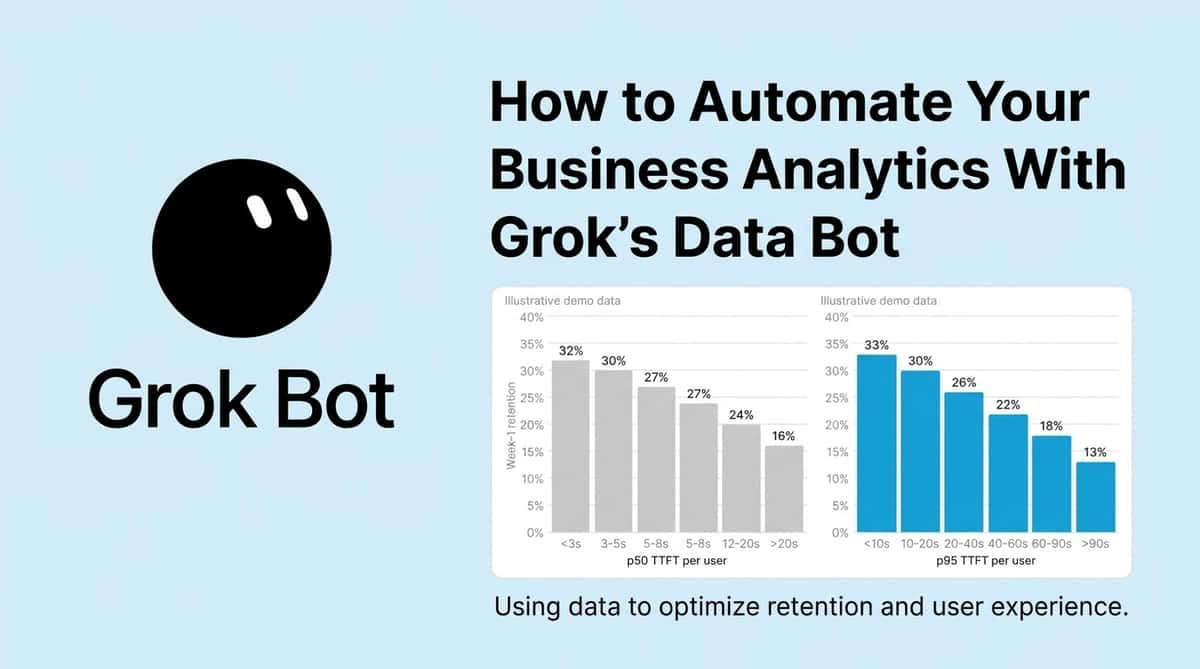
What if every team could ask a data scientist a question?
A marketing manager wants to know whether an email campaign generated paying customers. A product manager needs to understand why engagement has fallen. A founder wants to know which customer segment is driving revenue growth. Each question could require an analyst to find the right tables, write SQL queries, check the results and prepare a report. Grok’s Data Bot aims to reduce that waiting time by letting employees ask questions in natural language and receive data-backed answers.
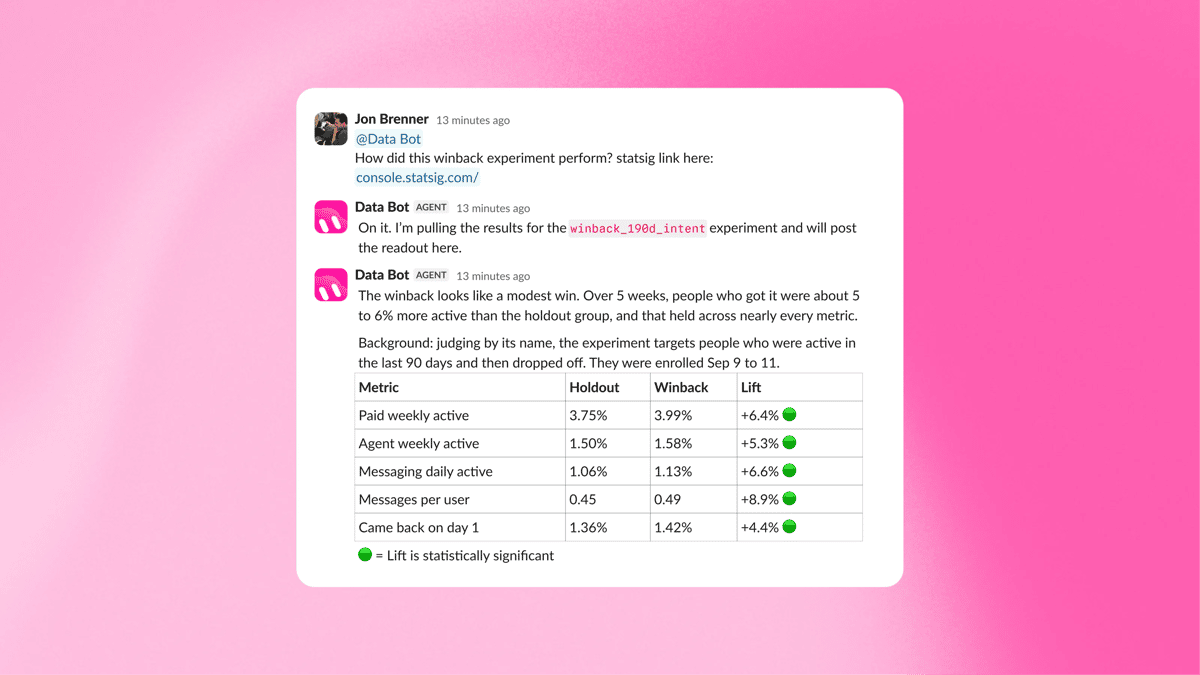
SpaceXSI introduced its approach in a November 2, 2026, describing how its data science team taught Data Bot to query a warehouse, investigate experiments, produce charts and build reports. The company also uses it in Slack, where employees can ask follow-up questions and receive scheduled updates.
For startups and small businesses, the opportunity is to make data analysis more accessible without hiring a large analytics team. The practical challenge is teaching the agent how the business measures performance, giving it access to the right information and checking its answers before making decisions.
What is Data Bot, and how does it work?
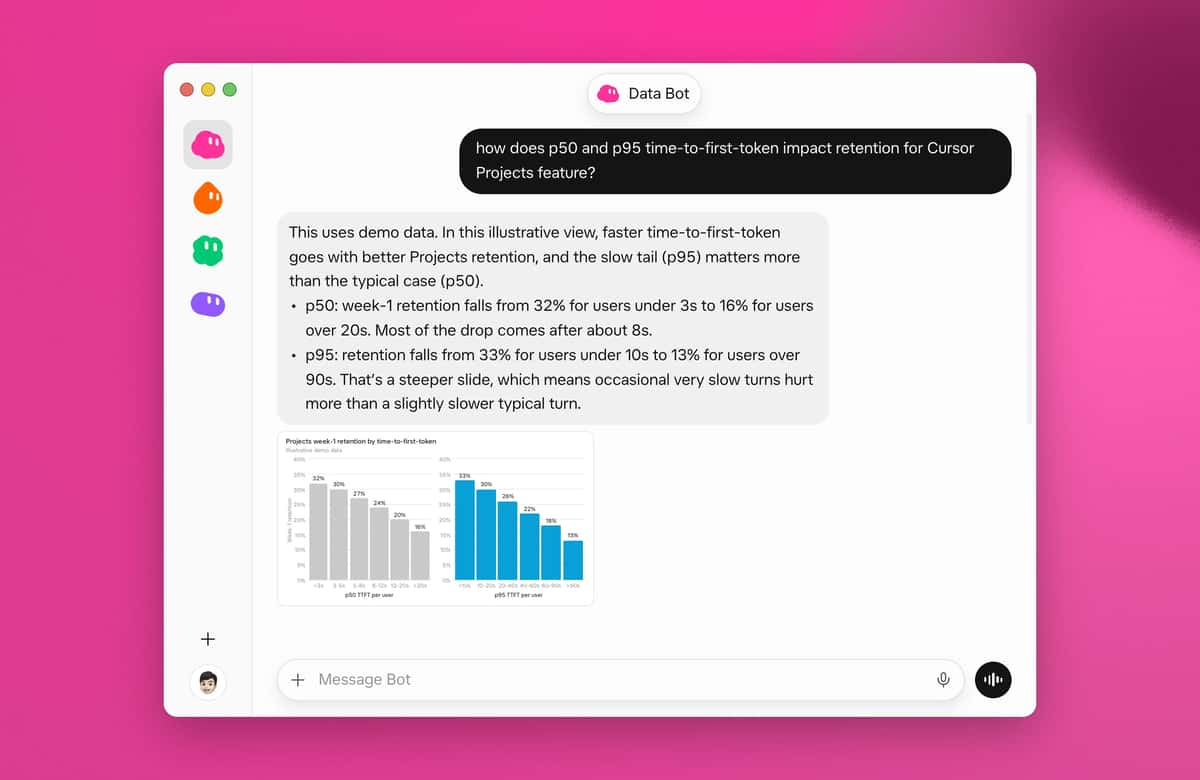
Data Bot is a shared bot within Grok Bot. Rather than relying entirely on general AI knowledge, it uses a set of company-specific instructions, known as skills, that explain how the organisation analyses its data. These skills can define core metrics such as revenue and active users, identify the relevant data sources, explain how experiments should be evaluated and establish conventions for charts and dashboards.
For example, a company might define how it calculates monthly recurring revenue, what counts as an active customer and which database tables contain subscription information. When an employee asks why revenue declined, Data Bot can use those definitions to investigate the change rather than inventing its own interpretation of the metric. There is also a shared memory, through which the bot can propose useful knowledge learned during everyday work. Managers can approve or reject those additions before they become available to other users.
This combination of instructions, data access and shared knowledge is what makes the approach useful for recurring business questions. The quality of the answer still depends on the quality of the underlying data and the instructions the team provides.
How to get started with Data Bot
The following workflow combines the capabilities from Data Bot with practical steps for introducing an AI analytics agent. Exact integrations and access requirements depend on your account, environment and available tools.
1. Confirm your Grok Bot access
Start with the official Grok Bot setup guide. The eligible access options, including certain paid X subscriptions, SuperGrok plans, legacy Cursor plans and Grok Business seats.
Install the desktop application or mobile app, sign in using the account associated with your access, and create or open a bot. If you are working with a team, confirm that your organisation's plan supports the sharing and controls you need.
Do not assume that a standard Grok chat account automatically includes every Grok Bot feature.
2. Identify the data you want to analyse
List the business questions you need to answer before connecting systems. A retailer might want to understand product sales, while a software startup may focus on subscriptions, customer retention and feature adoption.
Identify where those records live, such as a data warehouse, analytics platform or structured reporting database. Confirm which integrations are actually supported in your environment. The SpaceXSI case study describes Data Bot querying its own warehouse, but it does not provide a universal, step-by-step connection procedure for every third-party database. You may need an appropriate connector, a supported integration or help from your data engineering team.
Use a scoped account with the minimum necessary permissions. Start with read-only access to approved datasets rather than granting unrestricted access to your production systems.
3. Teach the bot your business metrics
This is one of the most important steps. An AI agent cannot reliably analyse a metric if different departments calculate it differently.
Create a short reference document that explains:
Metric definitions: What counts as revenue, a customer, a conversion or an active user?
Data sources: Which tables or reports are authoritative?
Time periods: Should reports use calendar months, rolling 30-day windows or financial periods?
Business rules: How should refunds, cancelled orders, test accounts and duplicate records be treated?
Reporting preferences: Should the answer include a headline, chart, comparison table or detailed explanation?
Ask the bot to follow these rules when answering analytics questions. Test its output against a report your team already trusts before relying on it for new analysis.
4. Turn successful tasks into reusable skills
Grok Bot's skill is a reusable set of instructions for performing a task. Once a one-off analysis works reliably, you can ask the bot to save the process as a skill, including its data sources, steps, expected output and safety boundaries.
For example, a weekly sales report might always compare actual revenue against target, highlight the largest changes by region and explain where further investigation is needed.
The routines that can run workflows on a schedule or in response to supported events. A team could use these to prepare regular reports, provided the necessary tools and integrations are configured. Start with a manual task, validate the result, save the skill and only then consider scheduling it. See the official skills and routines guide.
Prompts your team can use
These examples are starting points. Adapt the names of your metrics, tables and reporting periods to match your own systems.
For sales teams
Analyse our sales pipeline for the last 30 days.
Break down pipeline value, deals won, deals lost and conversion rates by sales representative and region.
Compare the results with the previous 30 days, cite the data sources and flag any missing data. Do not change any CRM records.
For marketing teams
Analyse campaign ID [your-campaign-id]. Compare recipients, clicks, conversions and revenue attributed to the campaign.
Where data is available, compare the results with a relevant control group.
Show the conversion rate, explain the calculation and distinguish observed results from possible explanations.
For product managers
Chart weekly active users and feature adoption over the last 12 weeks.
Compare the trend across customer segments and identify when the largest change occurred.
Check for tracking changes or other known factors before suggesting a cause.
For founders
Prepare a weekly business performance report using our approved definitions of revenue, new customers, retention and acquisition cost.
Compare each metric with the previous week and our target.
Highlight three areas requiring attention, show the supporting figures and state where the available data is insufficient.
For recurring reports
Turn this validated analysis into a reusable weekly reporting skill.
Document the data sources, metric definitions, calculation steps, output format and validation checks.
If data is missing or stale, report the problem instead of guessing.
What SpaceXSI's example reveals about the productivity opportunity
SpaceXSI says its Data Bot handled an estimated 70 hours of work during one week that would otherwise have gone to its data science team. Its examples include checking whether campaign recipients later switched subscriptions and investigating product adoption changes. Other businesses should measure their own results, including time saved, accuracy, correction rates and the effort required to maintain the system.
The larger benefit may be that employees investigate questions they previously would have ignored because asking an analyst took too long. An AI agent can help reduce the friction between noticing a problem and investigating it. However, faster answers are not automatically better decisions. A polished chart can still be based on incomplete tracking, a misleading comparison or an incorrect assumption. For a deeper look at using AI without creating additional work, read our guide to improving productivity with AI.
What should African startups and SMEs consider?
For African businesses operating with lean teams, an AI analytics assistant could help founders monitor sales, identify customer behaviour patterns and evaluate marketing expenditure without waiting for a specialist to prepare every report.
A small e-commerce business might investigate why orders are declining in one city. A logistics startup could analyse delivery delays by route. A digital agency might compare campaign results across clients. These uses are particularly attractive when the business already collects structured data but struggles to turn it into timely decisions. Still, adoption should begin with a clear business problem rather than a desire to automate everything. A small company with inconsistent spreadsheets may need to improve its data collection before an AI agent can produce dependable analysis.
Security also needs attention. Customer information, financial records and commercial strategy should not be exposed through unnecessarily broad permissions. Businesses should check provider terms, use approved integrations, limit access and require human approval before an agent makes consequential changes. Our analysis on data privacy concerns with AI explains why these safeguards deserve attention.
Final Thoughts
Grok's Data Bot offers a practical vision of business analytics: employees ask questions in everyday language, while an AI agent carries out much of the underlying investigation and reporting. The best way to approach it is to start small. Choose one recurring question, define the metrics, connect only the data needed, validate the answer and document the process. Expand to shared skills and scheduled routines only after the workflow proves reliable.
For startups, the goal is not to replace good data practice with AI. It is to make reliable data analysis available to more people, while keeping responsibility for accuracy, security and business decisions firmly within the team.
Read more: Free AI Marketing Course: How Udacity Helps Businesses Automate Marketing
Read more: How to Get Your First 50 Customers as an Early-Stage Startup in Africa
Read more: AI Makes Building Easier: Execution Is What Turns Ideas Into Companies
Read more: How to Build an AI-Native Team: A Practical Guide for Founders, Entrepreneurs and Student Builders

Author
Azeez LiadiAzeez is an AI Engineer, Data Scientist, founder, and Senior Tech Writer at Afritech Connect. A top 1% graduate of Lagos State University, he has worked with international startups and… Explore author & articles