How to Use AI to Improve Productivity at Work Without Creating More Work
Learn practical ways to use ChatGPT, Claude and AI agents for emails, research, meetings, presentations, competitor monitoring and repetitive work without wasting more time.

“AI is coming for your job” has become one of the most repeated warnings of the artificial-intelligence boom.
The reality is more complicated. AI will automate some jobs and parts of many others. But the International Labour Organization estimates that while one in four workers globally has some exposure to generative AI, transformation of jobs is more likely than complete replacement because most occupations still require human involvement. Read the ILO's research on generative AI and jobs
A more immediate risk for many office workers may therefore be this: someone doing your job who knows how to use AI could become considerably more productive than someone who doesn't.
The response shouldn't be panic. It should be learning how to make AI useful.
AI Productivity Isn't About Using AI for Everything
Using AI more does not automatically make you more productive. If a task previously took 30 minutes and you spend 20 minutes prompting ChatGPT followed by another 20 correcting its mistakes, you have created more work.
A better principle is:
Give AI repetitive, information-heavy and first-draft work. Keep humans responsible for judgment, important decisions, sensitive communication and final verification.
The productivity gains can be real. Recent research reviewed by the ILO finds measurable productivity improvements from generative AI, although results vary substantially by job, worker and task. The ILO also warns that reported time savings do not automatically translate into greater company output or higher wages.
Start with a simple question: What did I spend time doing yesterday that required work but very little judgment?
Reading long email threads? Summarising documents? Formatting reports? Searching competitors' websites? Writing similar customer responses? Turning meeting notes into tasks?
Those are good places to start.
1. Let AI Prepare Your Working Day
Instead of opening your inbox, calendar and task manager separately every morning, an AI assistant can potentially help compress them into one briefing where supported integrations are available.
For example, your instruction could be:
Review today's calendar and relevant emails. Give me my five priorities, meetings requiring preparation, unanswered important messages and deadlines. Put anything requiring my decision at the top.
The objective isn't to have AI decide what matters forever. Correct it initially: “Emails from clients are more important than newsletters,” or “Always highlight invoices awaiting approval.”
Over time, a well-configured workflow reduces the amount of information you manually sort before actual work begins.
Claude, for example, supports research alongside integrations that can provide context from email, calendars and documents. Anthropic explains Claude's Research and Workspace integrations
2. Stop Asking Questions and Start Giving Complete Tasks
There is a major difference between:
Write an email.
and:
Draft a reply to this customer. They are unhappy because delivery is four days late. Acknowledge the delay without admitting something we haven't verified. Explain that the package is now expected Tuesday. My normal writing style is concise and friendly. Maximum 120 words.
Think in four pieces:
Goal + context + constraints + expected output.
That works for ChatGPT, Claude and most other capable assistants. Give AI examples of your previous writing where your organisation's privacy rules permit it. Instead of repeatedly rewriting generic AI language, ask it to identify characteristics of your style—sentence length, greetings, level of formality and how you close messages—and use those characteristics in future drafts.
You still approve important communications.
3. Turn AI Into Your Competitor-Monitoring Assistant
Imagine running a business with ten competitors.
You could manually visit ten websites, LinkedIn pages, news searches and blogs every morning.
Or you could define what actually matters and have an AI monitoring workflow check for changes.
For example:
Every weekday morning, check these five competitors. Look for new product launches, pricing changes, partnerships, funding announcements, important blog posts and significant media coverage. Ignore routine social posts. Send me a short briefing containing what changed, why it matters to our company and links to the original sources. If nothing meaningful changed, don't alert me.
This has moved beyond theoretical prompting. ChatGPT's scheduled tasks can run recurring instructions and monitoring jobs, while supported Work workflows can use connected apps and web access. OpenAI gives examples including checking websites and dashboards each morning, summarising changes and reporting the results. See OpenAI's Scheduled Tasks documentation See OpenAI's examples of delegated workplace tasks
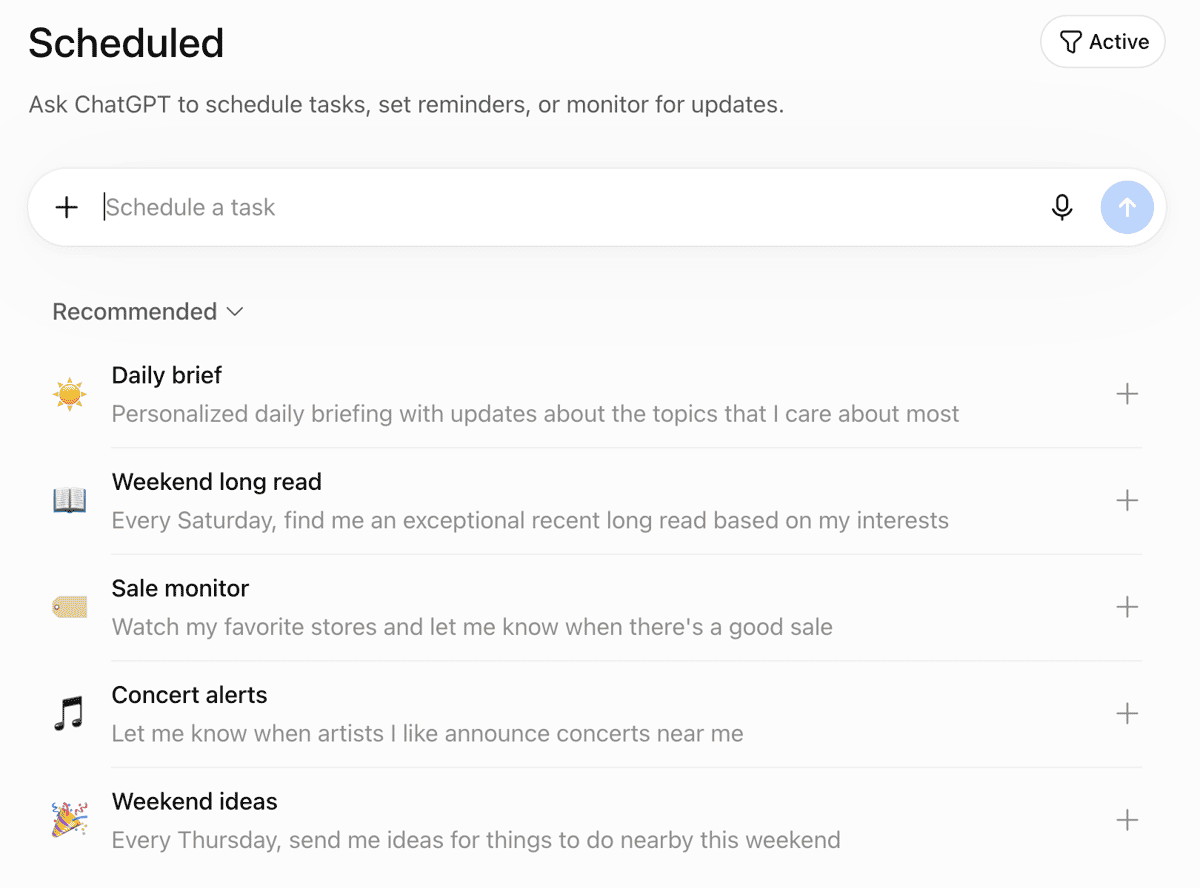
The important part is defining what constitutes a meaningful change. Otherwise, your AI assistant simply replaces information overload with AI-generated information overload.
4. Compress Information Before You Read Everything
Information compression is one of AI's most immediately useful workplace abilities.
A 40-message email thread can become:
Summarise this conversation into: decisions already made, unresolved questions, actions, owners and deadlines. Flag anything contradictory.
A 50-page industry report can become:
I manage a Nigerian fintech. Extract only findings relevant to customer acquisition, regulation, fraud and payment behaviour. Give page references so I can verify every important claim.
A meeting transcript can become actions assigned to specific people.
A spreadsheet can be analysed for anomalies, trends and unusual changes.
Two hundred customer comments can be grouped into recurring complaints.
The crucial habit is verification. Use AI to tell you where to look, not to make important source material unnecessary.
5. Build Presentations and Prototypes in Hours, Not Days
Suppose your manager asks you to explain a new customer-retention strategy at Friday's meeting.
The old workflow might involve researching the subject, organising an argument, creating charts, writing slide text, designing slides and rehearsing.
Instead, start by giving AI the raw material:
I need to explain this retention proposal to executives in 10 minutes. Analyse these customer figures and notes. Identify the three biggest problems. Propose an eight-slide narrative: problem, evidence, financial implication, proposed solution, implementation, risks and next steps. Tell me which charts would best demonstrate each argument.
You can then build and refine the presentation from that structure.
The same principle works for prototypes. Instead of spending a week explaining an application concept using static mockups, a worker with little programming experience can increasingly use coding agents to create a basic working demonstration.
A prompt might say:
Build a simple internal sales dashboard using this sample CSV. Show monthly revenue, leads, conversion rate and top-performing products. Add date filters. This is a prototype for a management presentation, not production software.
Tools such as Qoder are designed around agentic development: users describe a goal and constraints, while the agent can inspect context, plan, edit files and execute development tasks.
That doesn't suddenly make everyone a software engineer. Production systems still require security, testing, architecture and engineering judgment. But being able to turn an idea into something colleagues can see and interact with can dramatically improve communication.
Our guide to using coding agents to build businesses explores this approach further.
6. Let AI Draft Emails—But Don't Give Away Your Judgment
Email is a perfect example of low-value repetition consuming high-value human time.
Imagine receiving:
Can we move Thursday's meeting to Friday?
AI does not need ten paragraphs of reasoning to help.
With appropriate email integration and permissions, you could instruct an assistant:
Draft replies to routine scheduling messages based on my calendar. Keep them under 60 words and match my usual tone. Never send messages involving money, contracts, complaints or confidential information without my approval.
Supported ChatGPT Work event-triggered tasks can respond to new Gmail messages, subject to account availability, permissions and approval requirements. OpenAI explains event-triggered Work tasks
The valuable skill isn't asking AI to “reply to emails.”
It is defining which emails AI can handle, what rules it follows and when a human must intervene.
7. Move Up the AI Productivity Ladder
Think about AI adoption in five levels.
Level 1 — Ask: You ask questions, brainstorm and learn.
Level 2 — Assist: AI drafts emails, summarises documents, analyses information and creates first versions.
Level 3 — Collaborate: You and AI work through research, presentations, reports, coding or planning together.
Level 4 — Delegate: You define a complete, bounded task and an agent carries out multiple steps before returning the result.
Level 5 — Automate: A tested workflow repeats automatically, with human checkpoints where they matter.
Don't jump directly from Level 1 to Level 5.
If you cannot reliably get AI to perform a task manually, automating that unreliable process will simply produce mistakes faster. For people interested in experimenting beyond cloud assistants, our beginner's guide to building a local AI agent explains how agents can work with documents, email, coding and recurring business processes.
8. Measure Whether AI Actually Saved You Time
This is the test many organisations skip. Suppose preparing your weekly report normally takes 75 minutes.
With AI:
AI preparation: 25 minutes
Human checking and correction: 15 minutes
Total: 40 minutes
Actual saving: 35 minutes
That's productivity. If AI takes 25 minutes but requires another 55 minutes to verify and repair, it didn't improve the process. Track the tasks where AI consistently saves you time and stop forcing it into those where it doesn't.
What If Your Internet or AI Budget Is Limited?
This matters particularly for African freelancers, students and small businesses.
You don't need subscriptions to ten AI products. Choose one capable general assistant first. Batch related research rather than starting dozens of separate queries. Upload only the documents actually necessary for a task. Use cheaper models for routine summarisation and reserve premium models for difficult reasoning where the difference matters.
Where privacy, connectivity or recurring costs make cloud services unsuitable, smaller local models can also be useful for some tasks, although they require suitable hardware and technical setup.
Most importantly, compare the subscription cost with time returned. If an AI subscription costs you $20 but reliably saves eight working hours each month, ask what eight hours of your time are worth. If you barely use it, cancel it.
AI Won't Make Human Skills Irrelevant
AI's impact on employment is real, and pretending nobody will lose a job would be irresponsible.
But the evidence so far does not support the simplistic idea that AI will suddenly eliminate human work altogether. The ILO's latest review says large-scale employment displacement remains limited, while warning that the effects are uneven and that younger workers may face particular pressure.
The more useful response is to become harder to replace. Learn your profession deeply. Improve your judgment. Understand customers. Communicate clearly. Then learn how to make AI multiply those abilities.
The future accountant may still need accounting expertise but could analyse information faster with AI. The marketer may still need creativity and customer understanding but could monitor competitors automatically. The developer may still need engineering judgment but could delegate repetitive coding to agents. The manager still has to make decisions but may no longer need three days to turn information into a presentation.
The goal isn't to become excellent at writing prompts. It is to become excellent at getting useful work done with AI.
People who learn that distinction will spend less time worrying about whether AI is coming for their jobs, and more time deciding which parts of their jobs AI should start doing for them.
Read more: Andrew Ng’s AI Skills Map: 6 Skills African Should Learn to Build Real AI Products Part 2
Read more: Andrew Ng's AI Skills Map: 4 Skills African Youth Should Learn Now

Author
Azeez LiadiAzeez is an AI Engineer, Data Scientist, founder, and Senior Tech Writer at Afritech Connect. A top 1% graduate of Lagos State University, he has worked with international startups and… Explore author & articles