Nigeria's Postcode API: How It Works and How to Test It Without an API Key
Learn how Nigeria's new NIPOST postcode API works, validate codes with ng-postcode, test endpoints without an API key and integrate digital addresses into your app.
Imagine ordering a product online in Lagos and having to explain your address to a delivery rider over the phone.
After the filling station, turn left. You'll see a yellow building beside the transformer.
For millions of Nigerians, directions like these remain part of everyday deliveries. But what if an application could identify a specific building using a standardized postcode rather than relying entirely on landmarks and lengthy directions?
That is the ambition behind Nigeria's National Digital Alphanumeric Postcode System (NDAPS), launched by the Federal Government through the Nigerian Postal Service (NIPOST) on October 1, 2026. Unlike Nigeria's traditional six-digit postal codes, the new system assigns an 11-character alphanumeric reference to an addressable building or location. The government says it is designed to support logistics, e-commerce, financial services, emergency response and public service delivery.
More importantly for developers, NIPOST has published an API that allows applications to work with these digital postcodes. The challenge is knowing how to test it before committing to an integration.
Fortunately, Nigerian software developer Peter Oliha has created an open-source toolkit that makes experimentation considerably easier. This guide explains how the postcode system works, how to test it without an API key, and how to integrate it into a JavaScript or TypeScript application.
What is Nigeria's new digital postcode?
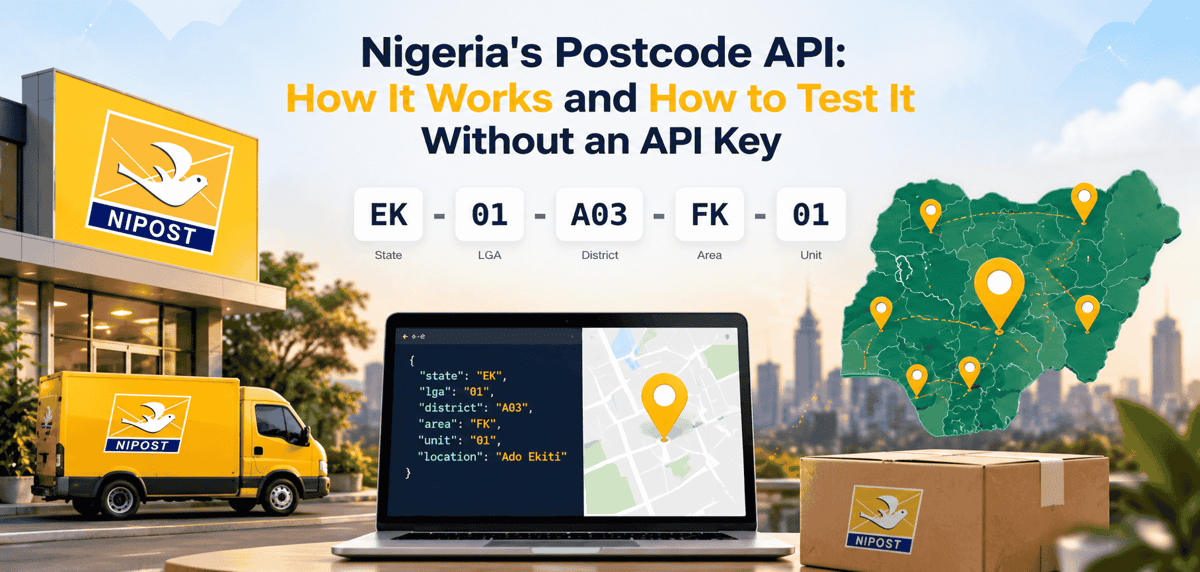
The new postcode is a structured code that identifies a location through five geographical segments.
For example:
EK-01-A03-FK-01
Each segment has a meaning.
Segment | Example | Meaning |
|---|---|---|
State | EK | State identifier, Ekiti |
LGA | 01 | Local government area |
District | A03 | District within the LGA |
Area | FK | Area within the district |
Unit | 01 | Building unit |
The code moves from a broad geographical area to a more specific building reference. According to NIPOST, the system uses Geographic Information System technology to support precise, verifiable digital location references.
The same postcode can appear in three formats:
EK-01-A03-FK-01
EK 01 A03 FK 01
EK01A03FK01
All three represent the same code. One small technical detail matters: the postcode contains 11 alphanumeric characters without separators. Including hyphens makes the formatted representation longer. When building validation logic, check the five segments rather than relying only on the total length of the displayed string.
Also, never invent a postcode for a real building. NIPOST instructs users to obtain or confirm their assigned code through its official postcode platform. .
What can developers build with the API?
Consider an e-commerce application. A customer enters a postcode at checkout.
The application validates the format, requests the relevant address information and asks the customer to confirm the location. The delivery team can then use the structured location reference alongside the written address.
This could reduce errors caused by incomplete addresses. Other potential applications include property-listing platforms, logistics systems, merchant onboarding, utility management, field-service scheduling and emergency-response applications.
A property platform could associate listings with their assigned digital postcodes, making it easier to organize location information.
A delivery startup could use postcode confirmation before dispatching an order.
A financial institution might use postcode data as one component of an address-verification workflow, subject to its access permissions and applicable law.
However, NIPOST's terms make an important distinction: a postcode alone does not establish someone's identity, property ownership or occupancy.
Developers should treat the postcode as a location reference, not proof of who lives or works there.
Understanding the NIPOST API
NIPOST's official developer documentation is available at: https://docs.postcode.gov.ng/
The API supports operations for searching, validating, assembling and looking up postcodes. The core lookup system is organized into five cumulative access levels.
Level | Information returned | Access |
|---|---|---|
L1 | Whether a postcode is valid | Free lookup, authentication required |
L2 | Administrative and recent house address | Credit-based |
L3 | Building-use information | Credit-based |
L4 | Additional building information | Credit-based |
L5 | Point geometry | Restricted |
Each level builds on the information available at lower levels. An important detail is that free does not mean unauthenticated. According to the API behavior documented by Peter Oliha, endpoints other than /healthz require an API key, including basic lookups that consume no credits.
NIPOST provides different credentials for development and production.
Test keys begin with nipost_test_ and work with the sandbox dataset.
Live keys begin with nipost_live_ and provide access to the production dataset according to the organization's verification and permissions.
There are also publishable credentials for supported browser and mobile integrations, with additional restrictions. Always consult the official authentication documentation before implementing production access.
Step 1: Install ng-postcode to validate postcodes offline
You don't need to call NIPOST's API every time a user types something into your postcode field. Many formatting errors can be detected locally.
Peter Oliha's open-source ng-postcode package provides JavaScript and TypeScript utilities for this purpose.
Install it using npm:
npm install ng-postcodeThen import its formatting and validation functions:
import {
  assemble,
  disassemble,
  format,
  isValidFormat,
  parse
} from 'ng-postcode';

const result = format('ek01a03fk01');

console.log(result);
The expected result is:
{
  postcode: 'EK-01-A03-FK-01',
  display: 'EK 01 A03 FK 01',
  compact: 'EK01A03FK01'
}
You can also construct a postcode from its segments:
const postcode = assemble({
  state: 'ek',
  lga: 1,
  district: 'a03',
  area: 'fk',
  unit: 1
});

console.log(postcode.postcode);
// EK-01-A03-FK-01
The library automatically handles formatting details such as uppercase letters and zero-filled numeric segments.
For validation:
isValidFormat('EK-00-A03-FK-01');
// false

parse('not a postcode');
// null
This is useful because invalid user input can be rejected before your application makes an unnecessary API request.
But remember: A postcode can have the correct format without being assigned to an actual building.
Offline validation confirms structure, not existence. Only an appropriate lookup against the postcode service can confirm that the code exists in the relevant dataset.
Step 2: Test the API without registering
This is where Oliha's contribution becomes particularly useful. The official NIPOST sandbox is intended for testing integrations against NIPOST's infrastructure.
However, developers who simply want to understand the API's response structure may prefer to experiment before creating an organization account. Oliha built a publicly accessible mock API that follows the documented endpoint paths and response structures.
You can try it directly: Open the ng-postcode mock API
Or open this example lookup in your browser: Try a sample postcode lookup
The mock is designed to return a response resembling:
{
  "data": {
    "postcode": "LA-11-W06-TC-10",
    "valid": true,
    "administrative_address": {
      "state_name": "LAGOS",
      "lga_name": "MOCK LGA 11",
      "locality_name": "MOCK LGA 11",
      "zone": "SOUTH WEST"
    },
    "recent_house_address": {
      "recent": "10 MOCK STREET, AREA TC, LAGOS"
    },
    "building_use_status": "commercial"
  },
  "mock": true
}
Notice the word MOCK. The address is simulated. It is not a verified residential or commercial address in Lagos. That distinction matters because developers should never accidentally treat demonstration data as an authoritative government record.
The mock also identifies simulated responses using an X-Mock: true header.
Step 3: Connect the mock API to your application
Suppose you are building a web application with JavaScript or TypeScript. Instead of manually making every HTTP request, you can use the typed client included with ng-postcode.
import {
  createPostcodeClient,
  PostcodeApiError
} from 'ng-postcode';

const api = createPostcodeClient({
  baseUrl: 'https://ng-postcode.oliha.dev'
});

async function checkPostcode() {
  try {
    const result = await api.lookup(
      'LA-11-W06-TC-10',
      2
    );

    console.log(
      result.administrative_address?.state_name
    );
  } catch (error) {
    if (
      error instanceof PostcodeApiError &&
      error.code === 'insufficient_credits'
    ) {
      console.log('Lookup credits unavailable');
    }
  }
}

checkPostcode();
This example performs an L2 lookup against the simulated service.
Once you are ready to use NIPOST's actual API, configure the client with the appropriate credentials instead of the mock base URL.
For example, in trusted server-side code:
const api = createPostcodeClient({
  apiKey: process.env.NIPOST_API_KEY
});
The client sends the credential through the X-API-Key header. Never put a secret live API key inside frontend JavaScript or commit it to a public GitHub repository.
Use server-side environment variables and follow NIPOST's published guidance for any credentials specifically designed for browser or mobile use.
Step 4: Test common API errors
A working API integration is not simply one that succeeds when everything is perfect. It must also handle failures.
What happens when a user enters an invalid postcode?
What if your API key is rejected?
What if your organization lacks permission to access a particular lookup level?
What if you run out of credits?
What if the API rate-limits your requests?
These situations are difficult to trigger deliberately against a production service. Oliha's mock solves that problem by providing reserved test keys.
Mock key | Simulated behavior |
|---|---|
| 401 authentication required |
| 401 invalid API key |
| 402 insufficient credits on L2+ |
| 403 access level not granted |
| 429 rate limit exceeded |
| Restricts lookups to L1 |
For example, your application should not crash when an L2 request fails because credits are unavailable. It could offer a basic L1 validation instead, where appropriate. Similarly, if a rate limit occurs, the app should avoid continuously retrying.
The mock's rate-limit scenario provides a Retry-After header to help you test appropriate retry behavior. These simulated responses are useful for development, but they should not be treated as guarantees that every undocumented production error will have exactly the same structure.
Step 5: Test your application without internet access
Automated tests should ideally be reliable even when external services are unavailable. You don't want a deployment pipeline to fail simply because a remote API temporarily stops responding.
The ng-postcode package includes Mock Service Worker (MSW) handlers that can intercept requests to the actual NIPOST API address during testing.
First, install MSW if your project does not already use it:
npm install --save-dev mswThen configure a test server:
import { setupServer } from 'msw/node';
import { postcodeHandlers } from 'ng-postcode/msw';

const server = setupServer(
  ...postcodeHandlers()
);

beforeAll(() => server.listen());

afterAll(() => server.close());
Your application code can continue using the official API address while the test environment intercepts supported requests and returns mock responses.
This approach helps developers test postcode forms, error handling and application workflows without depending on NIPOST's network availability.
For local testing outside a test runner, Oliha also provides a command-line mock server:
npx ng-postcode-mockThe mock server runs locally on port 8081 by default.
Step 6: Move from the mock to NIPOST's official sandbox
Once your integration behaves correctly against the mock, the next step is testing against NIPOST's actual gateway. Start at the official NIPOST developer documentation.
Create the required organization account and obtain a test credential through the documented onboarding process. Remember that NIPOST's sandbox and production datasets are separate.
For example: FC-01-A01-KP-27 is one of the documented sandbox examples.
Meanwhile: LA-11-W06-TC-10 is among the published sample codes associated with the live dataset.
Using a sample from the wrong dataset can produce a failed lookup even when your request is otherwise correct. After sandbox testing, organizations that require production access or higher lookup levels must complete the applicable verification and authorization requirements.
Don't bypass this process. It exists partly because detailed address information may be sensitive and should not be exposed indiscriminately.
Step 7: Add postcode verification to a real product
Consider a Nigerian e-commerce checkout. A practical user experience could look like this:
Customer enters their delivery address.
Customer enters or selects a digital postcode.
Your application validates the postcode format locally.
The backend requests the authorized lookup information.
The application displays the resolved location for confirmation.
The customer confirms the correct destination.
The order stores only the permitted and necessary location information.
This follows the government's recommended integration approach of capturing, validating, resolving, confirming, storing and reusing postcode information.
Keep the written address alongside the postcode. If the code cannot be resolved, don't substitute a nearby building's postcode merely to complete the form. Also check NIPOST's data-use terms before caching or retaining detailed lookup results.
What Nigerian developers should understand before going live
A national postcode system could become valuable digital infrastructure. But the API is not a magic solution to every address problem. Its usefulness depends on coverage, accurate records, reliable lookups, adoption by businesses and the ability of users to find and confirm their correct codes.
A postcode also should not become an excuse to collect unnecessary personal information. NIPOST's acceptable-use policy restricts unauthorized access, credential misuse and the processing or retention of personal data beyond authorized purposes.
For Nigerian startups, the opportunity is to solve practical problems.
A logistics platform could reduce failed deliveries.
A property startup could improve location referencing.
A field-service business could make site visits easier to coordinate.
But developers should measure those outcomes rather than assuming an API integration automatically improves their product. Start with one workflow, test it thoroughly, protect your credentials and expand only when the results justify it.
Final thoughts
Nigeria's new postcode system is an interesting example of public digital infrastructure that developers can build upon. The government has provided the addressing framework and API documentation.
Independent developers are already creating tools that make the technology easier to explore. Peter Oliha's ng-postcode package demonstrates why open-source contributions matter: they can reduce the time between discovering a new public API and building something useful with it.
If you are curious about the system, begin with the offline formatter and hosted mock. If your product needs official postcode information, proceed to NIPOST's sandbox and authorized production integration.
The goal is not merely to make an API call. It is to build something that helps Nigerians find, verify and use locations more reliably.
Contributor credit: This guide draws on the technical work and developer walkthrough by Peter Oliha, who created the independent open-source ng-postcode package, mock API and testing tools. Afritech Connect acknowledges his contribution to making Nigeria's postcode API easier for developers to explore.
Read his original walkthrough: Building on Nigeria's Postcode API.
Explore the open-source project: GitHub — poliha/ng-postcode.
Disclaimer: ng-postcode and its mock API are unofficial community tools. They are not affiliated with NIPOST or the Federal Ministry of Communications, Innovation and Digital Economy. For official onboarding, access permissions and production integration, consult NIPOST's API documentation.
Read more: How to Build an App With AI: A Complete Guide for Beginners
Read more: Claude Code vs OpenAI Codex vs Qoder: Which AI Coding Tool Is Best for African Developers?
Read more: Andrew Ng's AI Skills Map: 4 Skills African Youth Should Learn Now

Author
Azeez LiadiAzeez is an AI Engineer, Data Scientist, founder, and Senior Tech Writer at Afritech Connect. A top 1% graduate of Lagos State University, he has worked with international startups and… Explore author & articles