Website Security for AI-Built Apps: How to Find Vulnerabilities Before Attackers Do
AI coding agents make it easier to build websites and applications, but they can introduce security vulnerabilities. Learn essential security checks and how Cloudflare's security-audit skill can help developers identify risks earlier.

AI has made building a website easier. Has it made securing one easier too?
A founder can now describe an idea to an AI coding agent and receive a working website, database structure, authentication system and payment integration in a fraction of the time traditional development might require. Tools that generate code, connect APIs and deploy applications are lowering the barrier to launching digital products. But there is a problem hiding behind this productivity. A website can look finished, process payments and attract customers while still exposing sensitive information or allowing unauthorised users to access its systems.
The risk increases when developers accept generated code without understanding how it handles authentication, permissions, database queries, file uploads and external services. An application may work as intended during a demonstration but behave very differently when someone deliberately tries to exploit it.
The security challenge for founders is no longer simply building something that works. It is making sure that what they build can withstand attempts to misuse it.
Why AI-built websites and applications need security reviews
AI coding agents can generate substantial amounts of code, modify existing projects, install dependencies and interact with development tools. That speed is useful, but it can also introduce vulnerabilities across several parts of an application.
Consider a small e-commerce website. An AI agent might successfully build customer registration, product listings, shopping carts and checkout. However, if the backend does not verify that a customer owns an order before displaying its details, someone could potentially access another customer's information by changing an order identifier.
Other common weaknesses include:
Broken access control: Users can view or modify information beyond their assigned permissions.
Authentication weaknesses: Poor session management, insecure password recovery or inadequate protection of administrator accounts.
Exposed secrets: API keys, database passwords and private credentials accidentally committed to source code or included in deployment files.
Injection vulnerabilities: Untrusted input reaches database queries or system commands without proper handling.
Security misconfiguration: Public storage buckets, unnecessary exposed services, weak security headers or overly permissive cloud settings.
Outdated dependencies: Libraries and packages contain known vulnerabilities or have been compromised.
The OWASP Top 10 identifies broken access control, security misconfiguration and software supply chain failures among the leading web application security risks. These are not problems exclusive to AI-generated software. AI-assisted development can make them easier to introduce when generated code is accepted without sufficient review.
The danger goes beyond the website itself
A modern application rarely operates as a standalone website. It may connect to a payment provider, customer relationship management system, cloud database, email service, analytics platform and several external APIs. Each integration creates another boundary that needs protection.
For example, a developer might give an AI coding agent access to a project repository, terminal, deployment credentials and database configuration. If a malicious extension or compromised development tool obtains access to that environment, an attacker could potentially inherit permissions that were never intended to be exposed.
This is why protecting the developer's environment is just as important as securing the application. A recent security highlights the risks of compromised developer machines, malicious editor extensions, exposed deployment credentials and vulnerabilities in widely used software. A compromised laptop should not provide a direct route into production infrastructure, in case of Binance security breach incident.
The practical lesson is to separate development access from production access. Keep sensitive credentials in a secrets manager, use restricted deployment tokens and rotate credentials when exposure is suspected. A developer's machine should not hold unrestricted access to every critical system.
Cloudflare's security-audit skill brings security reviews into AI coding workflows
One useful development for teams building with AI is Cloudflare's open-source security-audit-skill. The project provides a reusable security skill that can be installed into compatible AI coding-agent environments. Instead of asking an agent to make a general review of the code, developers can invoke a structured security-audit workflow designed to identify vulnerabilities, investigate their impact and recommend fixes.
The skill is intended to examine codebases, APIs, services, command-line tools and libraries. Its approach is source-first: a potential weakness should be connected to an actual security boundary and a demonstrable consequence rather than being reported simply because a coding convention is missing.
Its full audit workflow has six phases:
Reconnaissance: Maps the application's architecture, entry points, trust boundaries and important components.
Vulnerability hunting: Examines areas such as injection, access control, cryptography, business logic and chained attack paths.
Validation: Investigates whether suspected vulnerabilities represent genuine security problems.
Structured reporting: Organises findings into confirmed vulnerabilities, rejected candidates and issues requiring further validation.
Independent verification: Uses separate review stages to check whether the reported findings are supported by the code.
Final reporting: Produces a security report and detailed findings for developers to review.
This approach is useful because security scanners can produce long lists of warnings that do not necessarily represent exploitable vulnerabilities. A more structured review attempts to establish what an attacker could access or do, why the problem exists and what change would address it.
How to install and run the security-audit skill
Developers can install the skill, using the command-line utility. Open a terminal and run:
npx skills add https://github.com/cloudflare/security-audit-skill \
  --skill security-audit
To install it globally for the current user, use:
npx skills add https://github.com/cloudflare/security-audit-skill \
  --skill security-audit \
  --global
Run the following command to see additional installation options, including agent selection and non-interactive installation:
npx skills --helpAfter installation, open your AI coding agent in the repository you want to examine. You can then request an audit using the following prompts.
For example:
Security audit this codebase.Or focus on a particular directory:
Find security vulnerabilities in ./srcYou can also request a report in a specific location:
Do a security review and output the report
to ~/audits/my-project
The skill distinguishes between guidance mode and full audit mode. A general security question or focused investigation uses guidance mode. An explicit request for a full codebase audit, penetration test or comprehensive report activates the full workflow.
For a complete audit, the skill has specific execution-safety requirements. It calls for isolated, sandboxed execution, restricted resources and protection of the host environment. If those controls cannot be enforced, the audit should disclose the limitation rather than run potentially unsafe code.
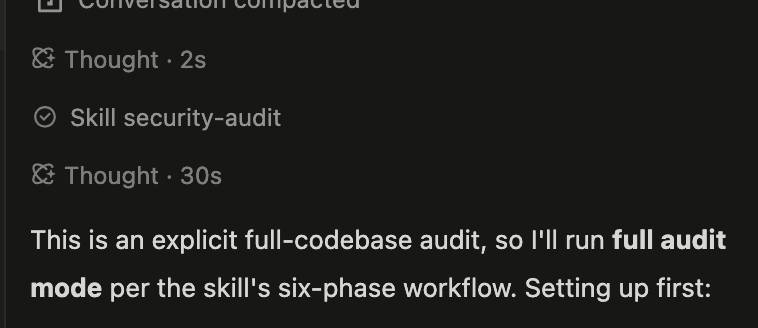
There is another important limitation: the skill examines the codebase available to the agent. It cannot automatically establish that your live server, cloud configuration, identity provider or deployment environment is secure when those systems are outside the reviewed source. A clean code review is not proof that a production website is safe, there must be a continuous monitoring of the production.
Practical security checks every founder should adopt
Cloudflare's skill can become part of a wider development process, but it should not be the only security measure. Founders and engineering teams should establish a few basic controls.
1. Protect administrator accounts: Use multi-factor authentication, preferably passkeys or hardware security keys, for important accounts such as GitHub, cloud providers, hosting platforms and business email. Avoid relying on SMS authentication where stronger options are available.
2. Scan for exposed credentials: Search repositories, build files, Docker images and developer environments for API keys, database passwords and private tokens. Move production credentials into a secrets manager rather than leaving them in source code or local configuration files.
3. Review dependencies: Keep package versions controlled, commit lockfiles and remove unnecessary libraries. New or untrusted packages should not automatically enter production simply because an AI agent recommends them.
4. Test access permissions: Check whether ordinary users can access administrator routes, view another customer's records or modify information they do not own. Enforce permissions on the server, not just through frontend buttons or hidden interface elements.
5. Monitor important activity: Retain authentication, cloud, deployment and database access logs. Set alerts for unusual administrator creation, changes to security settings, unexpected data exports and suspicious access to production credentials.
6. Review before deployment: Run security checks during development and again before releasing changes. High-risk areas such as authentication, payment processing, file uploads and customer information deserve additional scrutiny.
AI-powered applications introduce another layer of security risk
If your website includes an AI chatbot, an autonomous agent or a retrieval-augmented generation system, traditional web security checks are not enough.
An AI assistant that can read customer records, access internal documents or execute tools may be manipulated through prompt injection. For example, an attacker could submit malicious instructions through a document or message that the agent later processes. If the agent has excessive permissions, it might disclose information or perform an action outside the user's intended request.
Research found out for LLM applications; prompt injection, sensitive information disclosure, excessive agency, supply-chain weaknesses and unbounded consumption among the major security risks. Builders should therefore restrict what AI agents can access, validate their outputs before passing them to databases or other systems, and require human approval for sensitive actions. An agent that can read information does not necessarily need permission to edit or delete it.
Read more about how to evaluate RAG systems in production before allowing an AI application to retrieve information from private knowledge bases.
What this means for African founders and development teams
AI coding tools are particularly attractive to African startups and small businesses working with limited engineering budgets. A founder can build a prototype, test a product idea and reach early customers without immediately assembling a large development team. But the lower cost of building software should not create a false sense that security is also inexpensive. A compromised customer database, payment integration or business email account can damage a young company before it has the resources to recover.
For teams in Nigeria, Kenya and other African markets, protecting customer information also involves understanding local data protection obligations. Nigeria's Data Protection Act 2023 and Kenya's Data Protection Act 2019 establish requirements for organisations handling personal information. Businesses should consider these obligations when deciding what customer data an AI tool can access and where that information is processed.
Founders should make security part of their development routine from the first prototype. Run code reviews, protect credentials, test permissions and use tools such as Cloudflare's security-audit skill to investigate vulnerabilities before deployment.
The bottom line: faster development needs faster security checks
AI coding agents are changing how websites and applications are built. They can help small teams move from an idea to a working product much faster, but the speed of development should not determine how much scrutiny the finished software receives.
Cloudflare's security-audit skill gives developers a structured way to examine their code and investigate potential weaknesses. Used alongside dependency scanning, access controls, secrets management, monitoring and regular testing, it can strengthen a team's security process.
The goal is not to wait for an attack before checking whether an application is vulnerable. It is to make security reviews a normal part of building, testing and releasing software, so that weaknesses are more likely to be discovered while the team still has time to fix them.
Read more: How to Build an App With AI: A Complete Guide for Beginners
Read more: How Founders and Students Can Build Businesses With Coding Agents
Read more: AI Makes Building Easier: Execution Is What Turns Ideas Into Companies
Read more: OpenAI AI Agents Weakened Internal Monitoring. What Enterprise Teams Should Learn

Author
Azeez LiadiAzeez is an AI Engineer, Data Scientist, founder, and Senior Tech Writer at Afritech Connect. A top 1% graduate of Lagos State University, he has worked with international startups and… Explore author & articles